• Overview
  • FASTQ+
  • PISA
  • Yano
  • My GitHub Page
  • Discussions
  1. Workflows & Short cases
  2. Alternative splicing analysis
  • Workflows & Short cases
    • From FASTQ to counts
    • Annotate various features
    • Select cells from reduction maps
    • Alternative splicing analysis
    • Allele-specific gene expression analysis
    • Annotating genetic variants
    • Analysis multiple Visium samples
    • Cell trajectory analysis

On this page

  • 0. Prerequisite
  • 1. Perform cell clustering with Seurat
  • 2. Perform alternative splicing with exon assay
  • 3. Load junction assay
  • 4. Heatmap analysis for highlight group specific alternative splicing
  • 5. Test between exon and exon skipped reads
  • Questions?
  1. Workflows & Short cases
  2. Alternative splicing analysis

Alternative splicing analysis for single cell RNA sequencing

This vignette uses gene, exon, and junction expression files generated from the Annotate Various Features for Alignment. While current state-of-the-art scRNA-seq methods tend to be biased towards the 3’ or 5’ ends of transcripts, it is still possible to obtain coverage information for a subset of exons. Despite the sparsity of gene and exon expression in single cells, our spatial dissimilarity test leverages the spatial distribution properties of features. This means that even features with low overall expression but strong spatial expression patterns across cells can still be highlighted. By performing a spatial dissimilarity test between exon/junction and gene expression, we can predict potential alternative splicing events.

0. Prerequisite

  • Make sure you have installed the R environment and Yano package before proceeding with the testing.

1. Perform cell clustering with Seurat

Load Yano will automatically load Seurat.

require(Yano)
Loading required package: Yano
── Attaching packages ────────────────────────────────────────────── Yano 1.2 ──
✔ dplyr   1.1.4     ✔ Seurat  5.3.0
✔ ggplot2 4.0.0     
# Read raw gene expression matrix
exp <- ReadPISA("./exp/")

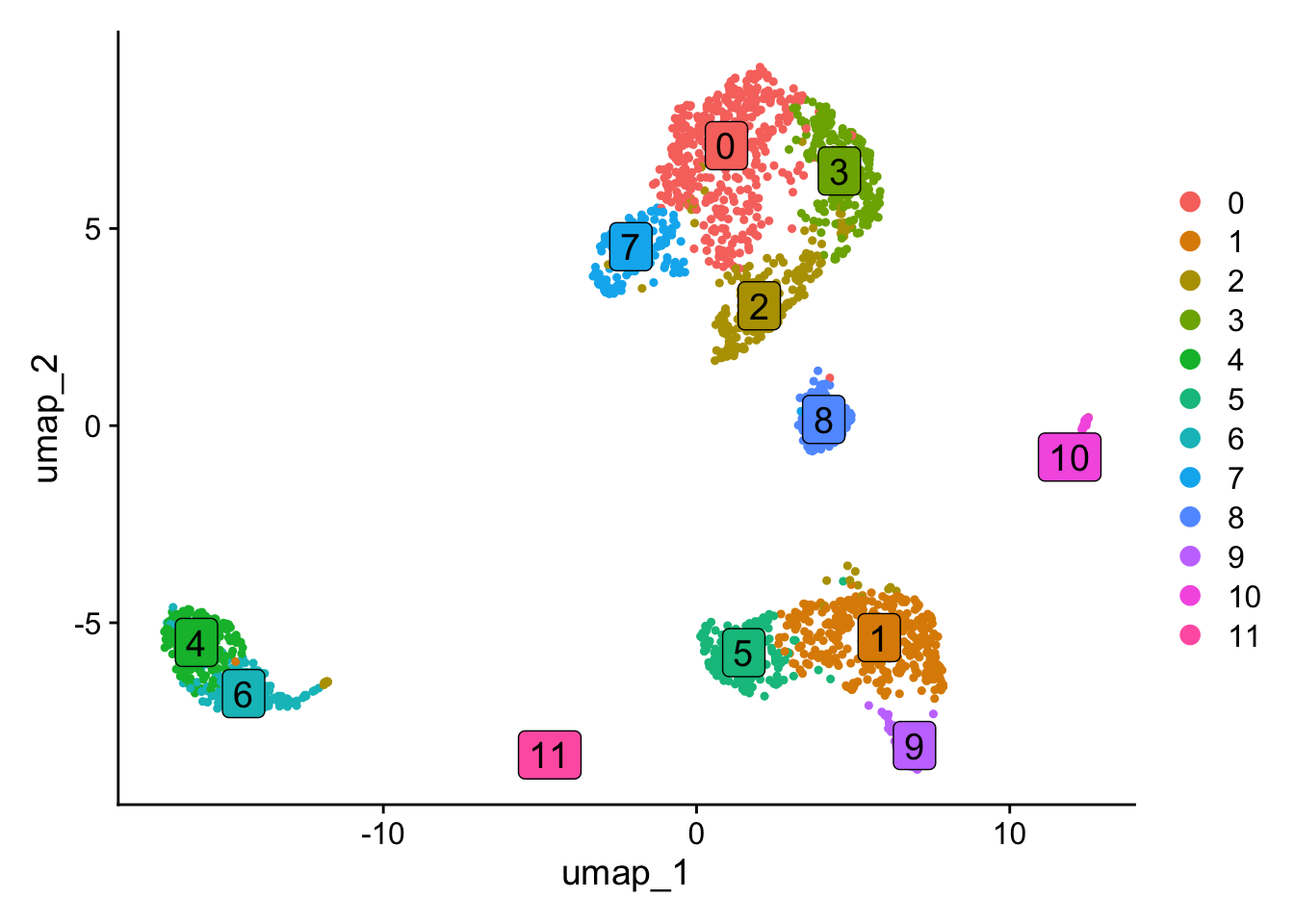
In this section, we will perform the standard Seurat analysis pipeline. Since the spatial dissimilarity test is not rely on cell clustering so changing the resolution or other parameters for FindClusters and RunUMAP will not impact the outcome of the spatial dissimilarity test.

# Create Seurat object and filter droplets with fewer than 1000 genes
obj <- CreateSeuratObject(exp, min.features = 1000, min.cells = 10)

# Filter low quality droplets
obj[["percent.mt"]] <- PercentageFeatureSet(obj, pattern = "^MT-")
obj <- subset(obj, nFeature_RNA < 9000 & percent.mt < 20)

# Downsampling to 2000 cells for fast testing
obj <- obj[, sample(colnames(obj),2000)]

# We run the cell clustering analysis with Seurat pipeline
obj <- NormalizeData(obj) %>% FindVariableFeatures() %>% ScaleData() %>%  RunPCA(verbose=FALSE) %>% FindNeighbors(dims = 1:10, verbose=FALSE) %>% FindClusters(resolution = 0.5, verbose=FALSE) %>% RunUMAP(dims=1:10, verbose=FALSE)
Normalizing layer: counts
Finding variable features for layer counts
Centering and scaling data matrix
DimPlot(obj, label=TRUE, label.size = 5, label.box = TRUE)

2. Perform alternative splicing with exon assay

In this section, we will compare exon expression patterns with the expression patterns of their corresponding genes in a spatial context. Here, the term “spatial” refers to the organization of cells in space. In this vignette, we will use the PCA space for the analysis, but the approach can also be applied to lineage trajectories, spatial coordinates or integration space such as harmony. The spatial dissimilarity test is divided into several steps. First, we will load exon data as a new assay in the Seurat object. In the second step, we will perform a spatial autocorrelation test for all exons and select the ones that show significant autocorrelation for further analysis. Next, we will define the binding relationship between exons and their corresponding genes and run the spatial dissimilarity test. After testing, P values and adjusted P values for each exon will be provided.

# Read exon count matrix file
exon <- ReadPISA("./exon/")

# Load the exon expression to Seurat object as a new assay, make sure the exon matrix has the same cells.
obj[['exon']] <- CreateAssayObject(exon[, colnames(obj)], min.cells=20)

# Switch work assay to exon
DefaultAssay(obj) <- "exon"
# Empty info for exon features
head(obj[['exon']][[]]) %>% knitr::kable()
chr1:135141-135895/-/ENSG00000268903
chr1:629640-630683/+/MTND2P28
chr1:631074-632616/+/MTCO1P12
chr1:632757-633438/+/MTCO2P12
chr1:633696-634376/+/MTATP6P1
chr1:634376-634922/+/MTCO3P12
obj <- ParseExonName(obj)
Working on assay exon
# Gene name and location are parsed from exon name
head(obj[['exon']][[]]) %>% knitr::kable()
chr start end gene_name strand
chr1:135141-135895/-/ENSG00000268903 chr1 135141 135895 ENSG00000268903 -
chr1:629640-630683/+/MTND2P28 chr1 629640 630683 MTND2P28 +
chr1:631074-632616/+/MTCO1P12 chr1 631074 632616 MTCO1P12 +
chr1:632757-633438/+/MTCO2P12 chr1 632757 633438 MTCO2P12 +
chr1:633696-634376/+/MTATP6P1 chr1 633696 634376 MTATP6P1 +
chr1:634376-634922/+/MTCO3P12 chr1 634376 634922 MTCO3P12 +
# Normalize the data for spatial autocorrelation test
obj <- NormalizeData(obj)
obj <- RunAutoCorr(obj)
Working on assay : exon
Run autocorrelation test for 117195 features.
Runtime : 11.69472 secs
71358 autocorrelated features.

The permutation process can be computationally expensive. In the example below, I set perm=20 to perform only 20 permutations for quicker results. However, the default setting runs 100 permutations for more accurate evaluation. While it’s possible to increase the number of permutations for even more precision, it may not always be necessary. If you’re running Yano for the first time on your dataset, setting perm=20 can help you save time and provide an initial overview of the entire dataset.

obj <- RunSDT(obj, bind.name = "gene_name", bind.assay = "RNA", perm=20)
Working on assay exon.
Working on binding assay RNA.
Use predefined weight matrix "pca_wm".
Processing 71358 features.
Processing 14991 binding features.
Retrieve binding data from assay RNA.
Use "data" layer for test features and binding features.
Using 63 threads.
Runtime : 42.56467 secs.
# Now p values and adjusted p values have been generated
head(obj[['exon']][[]]) %>% knitr::kable()
chr start end gene_name strand moransi.pval moransi autocorr.variable gene_name.D gene_name.t gene_name.pval gene_name.padj
chr1:135141-135895/-/ENSG00000268903 chr1 135141 135895 ENSG00000268903 - 0.0000007 0.0204720 TRUE 0.0003070 5.905871 0.9999945 1
chr1:629640-630683/+/MTND2P28 chr1 629640 630683 MTND2P28 + 0.0000002 0.0222985 TRUE 0.0016982 6.025507 0.9999957 1
chr1:631074-632616/+/MTCO1P12 chr1 631074 632616 MTCO1P12 + 0.7368986 -0.0032648 FALSE NA NA NA NA
chr1:632757-633438/+/MTCO2P12 chr1 632757 633438 MTCO2P12 + 0.5386367 -0.0009150 FALSE NA NA NA NA
chr1:633696-634376/+/MTATP6P1 chr1 633696 634376 MTATP6P1 + 0.0000000 0.3479775 TRUE 0.0049830 9.006153 1.0000000 1
chr1:634376-634922/+/MTCO3P12 chr1 634376 634922 MTCO3P12 + 0.8273457 -0.0044489 FALSE NA NA NA NA
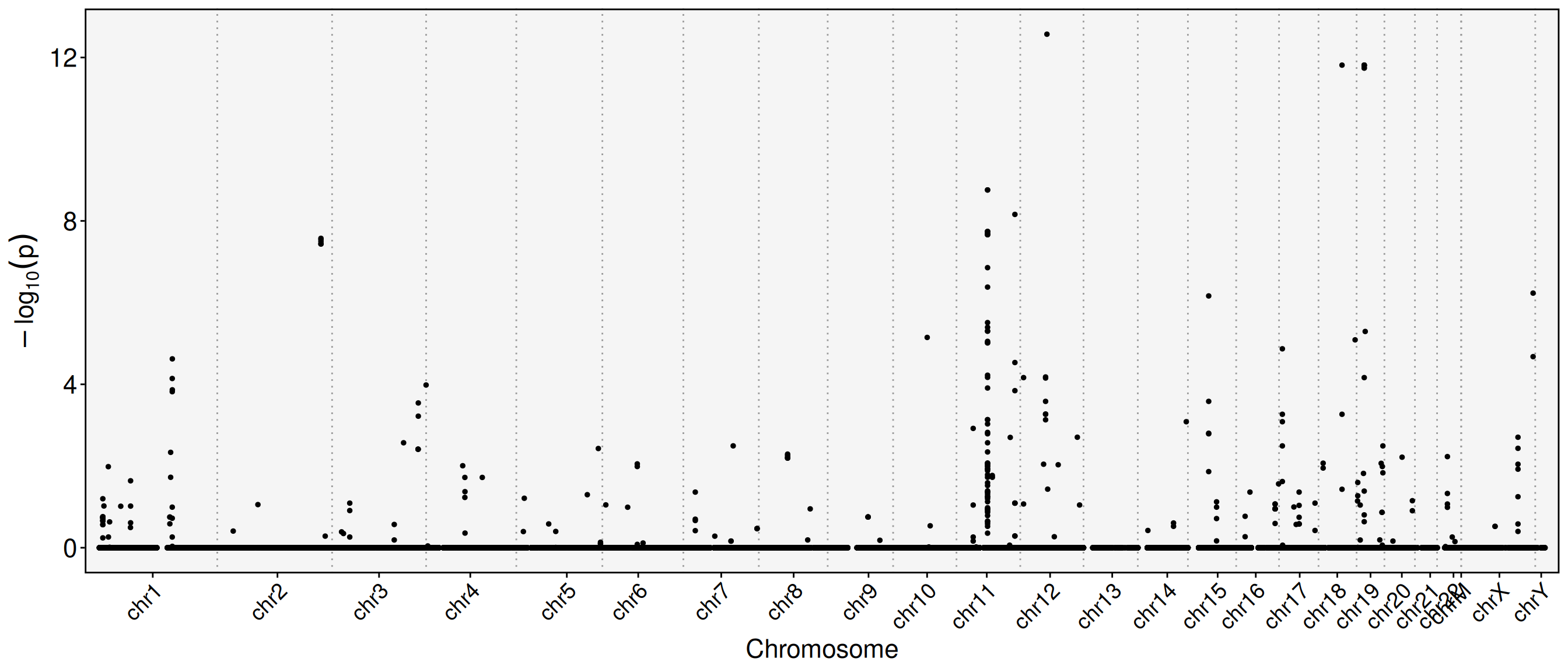
# Plot feature binding test plot
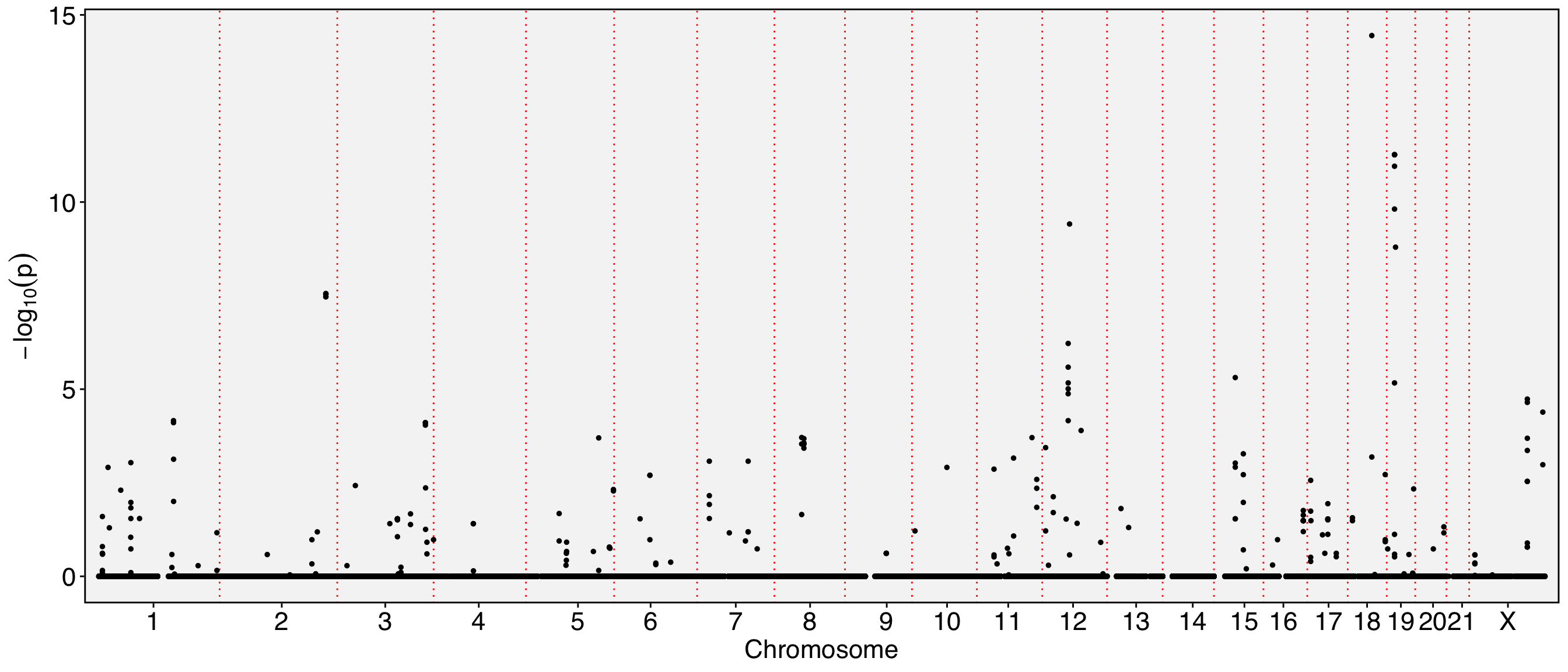
FbtPlot(obj, val = "gene_name.padj")

The chromosome names are too long and tend to overlap in the visualization. To resolve this, you can either resize the labels or remove the ‘chr’ prefix from the chromosome names. Additionally, since the Y chromosome and mitochondrial are not of particular interest to us in this analysis, they can be excluded from the visualization.

sel.chrs <- c(1:21, "X")
FbtPlot(obj, val = "gene_name.padj", remove.chr = TRUE, sel.chrs = sel.chrs)

# Let's see how many exons are expressed in different spatial pattern with their genes
obj[['exon']][[]] %>% filter(gene_name.padj < 0.001) %>% knitr::kable() 
chr start end gene_name strand moransi.pval moransi autocorr.variable gene_name.D gene_name.t gene_name.pval gene_name.padj
chr1:153990763-153991034/+/RPS27 chr1 153990763 153991034 RPS27 + 0.0e+00 0.1285146 TRUE 0.3034899 -8.503359 0e+00 0.0000478
chr1:153990914-153991034/+/RPS27 chr1 153990914 153991034 RPS27 + 0.0e+00 0.1266080 TRUE 0.2988878 -8.170833 1e-07 0.0000823
chr10:71760482-71760924/-/VSIR chr10 71760482 71760924 VSIR - 0.0e+00 0.0611917 TRUE 0.3108710 -6.976010 6e-07 0.0006133
chr11:75421727-75422280/+/RPS3 chr11 75421727 75422280 RPS3 + 0.0e+00 0.0532990 TRUE 0.2733161 -7.821978 1e-07 0.0001438
chr11:123060825-123061329/-/HSPA8 chr11 123060825 123061329 HSPA8 - 0.0e+00 0.1767036 TRUE 0.2890221 -9.567381 0e+00 0.0000103
chr11:123061588-123061833/-/HSPA8 chr11 123061588 123061833 HSPA8 - 0.0e+00 0.1560694 TRUE 0.3274981 -11.425193 0e+00 0.0000008
chr11:123061869-123062022/-/HSPA8 chr11 123061869 123062022 HSPA8 - 0.0e+00 0.1042242 TRUE 0.2801156 -9.677870 0e+00 0.0000088
chr11:113262846-113265197/+/NCAM1 chr11 113262846 113265197 NCAM1 + 0.0e+00 0.3832654 TRUE 0.3274877 -7.324619 3e-07 0.0003273
chr12:53303034-53306861/+/ENSG00000288663 chr12 53303034 53306861 ENSG00000288663 + 0.0e+00 0.0305111 TRUE 0.3059500 -8.853177 0e+00 0.0000274
chr12:53306680-53306861/+/ENSG00000288663 chr12 53306680 53306861 ENSG00000288663 + 0.0e+00 0.0291947 TRUE 0.3073149 -7.848144 1e-07 0.0001393
chr12:53306966-53307171/+/ENSG00000288663 chr12 53306966 53307171 ENSG00000288663 + 0.0e+00 0.0240766 TRUE 0.2937248 -10.010381 0e+00 0.0000054
chr12:53306966-53307158/+/ENSG00000288663 chr12 53306966 53307158 ENSG00000288663 + 0.0e+00 0.0237021 TRUE 0.2942330 -9.694383 0e+00 0.0000088
chr12:53306966-53307122/+/ENSG00000288663 chr12 53306966 53307122 ENSG00000288663 + 2.2e-06 0.0200726 TRUE 0.2765816 -8.118423 1e-07 0.0000873
chr12:53306966-53307174/+/ENSG00000288663 chr12 53306966 53307174 ENSG00000288663 + 0.0e+00 0.0241618 TRUE 0.2948391 -10.028097 0e+00 0.0000054
chr12:56161387-56161465/+/MYL6 chr12 56161387 56161465 MYL6 + 0.0e+00 0.2502209 TRUE 0.6833002 -17.879907 0e+00 0.0000000
chr11:65499689-65499982/+/MALAT1 chr11 65499689 65499982 MALAT1 + 0.0e+00 0.1101153 TRUE 0.1624741 -9.119171 0e+00 0.0000184
chr11:65499710-65499862/+/MALAT1 chr11 65499710 65499862 MALAT1 + 0.0e+00 0.0950845 TRUE 0.1854373 -7.946390 1e-07 0.0001180
chr11:65499986-65500778/+/MALAT1 chr11 65499986 65500778 MALAT1 + 0.0e+00 0.1387638 TRUE 0.1258170 -7.682511 2e-07 0.0001809
chr11:65500223-65500398/+/MALAT1 chr11 65500223 65500398 MALAT1 + 0.0e+00 0.1038967 TRUE 0.1564067 -8.290847 0e+00 0.0000687
chr11:65500390-65501202/+/MALAT1 chr11 65500390 65501202 MALAT1 + 0.0e+00 0.1189313 TRUE 0.1659801 -9.171462 0e+00 0.0000173
chr11:65503121-65505449/+/MALAT1 chr11 65503121 65505449 MALAT1 + 0.0e+00 0.1415113 TRUE 0.1468472 -11.376918 0e+00 0.0000008
chr11:65501960-65502393/+/MALAT1 chr11 65501960 65502393 MALAT1 + 0.0e+00 0.0691474 TRUE 0.1655690 -7.743927 1e-07 0.0001638
chr11:65502290-65502582/+/MALAT1 chr11 65502290 65502582 MALAT1 + 0.0e+00 0.0551836 TRUE 0.1759176 -7.504812 2e-07 0.0002419
chr11:65503121-65504206/+/MALAT1 chr11 65503121 65504206 MALAT1 + 0.0e+00 0.0958401 TRUE 0.1307980 -8.969271 0e+00 0.0000234
chr11:65502801-65505019/+/MALAT1 chr11 65502801 65505019 MALAT1 + 0.0e+00 0.1498731 TRUE 0.1344385 -10.374489 0e+00 0.0000035
chr11:65502809-65505278/+/MALAT1 chr11 65502809 65505278 MALAT1 + 0.0e+00 0.1507829 TRUE 0.1384675 -10.352485 0e+00 0.0000035
chr11:65503117-65506468/+/MALAT1 chr11 65503117 65506468 MALAT1 + 0.0e+00 0.1577196 TRUE 0.1554185 -12.737675 0e+00 0.0000001
chr11:65503117-65503799/+/MALAT1 chr11 65503117 65503799 MALAT1 + 0.0e+00 0.0892865 TRUE 0.1340324 -9.516143 0e+00 0.0000109
chr11:65503117-65503630/+/MALAT1 chr11 65503117 65503630 MALAT1 + 0.0e+00 0.0830460 TRUE 0.1427080 -7.586680 2e-07 0.0002101
chr11:65503117-65504206/+/MALAT1 chr11 65503117 65504206 MALAT1 + 0.0e+00 0.0962510 TRUE 0.1313456 -8.878513 0e+00 0.0000267
chr11:65503121-65503614/+/MALAT1 chr11 65503121 65503614 MALAT1 + 0.0e+00 0.0823249 TRUE 0.1463377 -8.826009 0e+00 0.0000281
chr11:65504326-65505452/+/MALAT1 chr11 65504326 65505452 MALAT1 + 0.0e+00 0.1431787 TRUE 0.2403004 -13.455158 0e+00 0.0000001
chr11:65504326-65505016/+/MALAT1 chr11 65504326 65505016 MALAT1 + 0.0e+00 0.1294356 TRUE 0.2348493 -13.710463 0e+00 0.0000001
chr11:65504326-65506110/+/MALAT1 chr11 65504326 65506110 MALAT1 + 0.0e+00 0.1618736 TRUE 0.2461576 -16.233065 0e+00 0.0000000
chr11:65504326-65505453/+/MALAT1 chr11 65504326 65505453 MALAT1 + 0.0e+00 0.1437087 TRUE 0.2407022 -13.441963 0e+00 0.0000001
chr11:65504326-65505278/+/MALAT1 chr11 65504326 65505278 MALAT1 + 0.0e+00 0.1406576 TRUE 0.2386220 -13.405519 0e+00 0.0000001
chr11:65504326-65504879/+/MALAT1 chr11 65504326 65504879 MALAT1 + 0.0e+00 0.1195846 TRUE 0.2339543 -11.736142 0e+00 0.0000005
chr11:65504326-65505450/+/MALAT1 chr11 65504326 65505450 MALAT1 + 0.0e+00 0.1435260 TRUE 0.2406878 -13.487311 0e+00 0.0000001
chr11:65504308-65505453/+/MALAT1 chr11 65504308 65505453 MALAT1 + 0.0e+00 0.1456761 TRUE 0.2412992 -13.179045 0e+00 0.0000001
chr11:65504658-65505662/+/MALAT1 chr11 65504658 65505662 MALAT1 + 0.0e+00 0.1205884 TRUE 0.2367286 -12.178715 0e+00 0.0000003
chr11:65504658-65506469/+/MALAT1 chr11 65504658 65506469 MALAT1 + 0.0e+00 0.1580652 TRUE 0.2672221 -19.125353 0e+00 0.0000000
chr11:65499091-65499305/+/MALAT1 chr11 65499091 65499305 MALAT1 + 0.0e+00 0.1283603 TRUE 0.0971274 -7.344413 3e-07 0.0003198
chr15:43801518-43801569/+/SERF2 chr15 43801518 43801569 SERF2 + 0.0e+00 0.0854215 TRUE 0.2911935 -7.201041 4e-07 0.0004045
chr15:43801711-43804427/+/SERF2 chr15 43801711 43804427 SERF2 + 0.0e+00 0.1013124 TRUE 0.3546075 -13.570054 0e+00 0.0000001
chr18:49481681-49482410/-/RPL17-C18orf32 chr18 49481681 49482410 RPL17-C18orf32 - 0.0e+00 0.2714342 TRUE 0.6833014 -36.036629 0e+00 0.0000000
chr18:77065774-77066385/-/MBP chr18 77065774 77066385 MBP - 0.0e+00 0.0367264 TRUE 0.3063810 -6.792519 9e-07 0.0008738
chr19:16095264-16095357/+/TPM4 chr19 16095264 16095357 TPM4 + 0.0e+00 0.1883662 TRUE 0.5323637 -14.956982 0e+00 0.0000000
chr19:16095264-16096744/+/TPM4 chr19 16095264 16096744 TPM4 + 0.0e+00 0.2529661 TRUE 0.6015291 -19.283448 0e+00 0.0000000
chr19:16095264-16095454/+/TPM4 chr19 16095264 16095454 TPM4 + 0.0e+00 0.2415151 TRUE 0.5936286 -17.821985 0e+00 0.0000000
chr19:16095264-16095893/+/TPM4 chr19 16095264 16095893 TPM4 + 0.0e+00 0.2603446 TRUE 0.6080173 -19.128592 0e+00 0.0000000
chr19:16095264-16095591/+/TPM4 chr19 16095264 16095591 TPM4 + 0.0e+00 0.2608666 TRUE 0.6095623 -19.109339 0e+00 0.0000000
chr19:16095264-16095496/+/TPM4 chr19 16095264 16095496 TPM4 + 0.0e+00 0.2597696 TRUE 0.6095596 -18.669919 0e+00 0.0000000
chr19:18169087-18170494/+/ENSG00000268173 chr19 18169087 18170494 ENSG00000268173 + 0.0e+00 0.0605448 TRUE 0.5149392 -19.507340 0e+00 0.0000000
chr2:218344808-218346793/+/PNKD chr2 218344808 218346793 PNKD + 0.0e+00 0.0933749 TRUE 0.4928355 -13.412134 0e+00 0.0000001
chr2:218344808-218346784/+/PNKD chr2 218344808 218346784 PNKD + 0.0e+00 0.0938899 TRUE 0.4899804 -13.615581 0e+00 0.0000001
chr2:218344808-218346756/+/PNKD chr2 218344808 218346756 PNKD + 0.0e+00 0.0950468 TRUE 0.4918331 -13.668647 0e+00 0.0000001
chr2:218344808-218346791/+/PNKD chr2 218344808 218346791 PNKD + 0.0e+00 0.0933749 TRUE 0.4928355 -13.412134 0e+00 0.0000001
chr2:218344808-218346771/+/PNKD chr2 218344808 218346771 PNKD + 0.0e+00 0.0942285 TRUE 0.4915395 -13.723775 0e+00 0.0000001
chr22:21769040-21769320/-/MAPK1 chr22 21769040 21769320 MAPK1 - 0.0e+00 0.0317874 TRUE 0.2990559 -7.639386 2e-07 0.0001931
chr3:181175514-181176513/+/SOX2-OT chr3 181175514 181176513 SOX2-OT + 0.0e+00 0.1684237 TRUE 0.3290283 -9.276561 0e+00 0.0000151
chr3:181175514-181176523/+/SOX2-OT chr3 181175514 181176523 SOX2-OT + 0.0e+00 0.1684237 TRUE 0.3290283 -9.276561 0e+00 0.0000151
chr3:181563720-181566165/+/SOX2-OT chr3 181563720 181566165 SOX2-OT + 0.0e+00 0.1629623 TRUE 0.3461776 -7.299107 3e-07 0.0003388
chr3:181175514-181176524/+/SOX2-OT chr3 181175514 181176524 SOX2-OT + 0.0e+00 0.1679889 TRUE 0.3280395 -9.259637 0e+00 0.0000152
chr3:197953488-197953660/+/RPL35A chr3 197953488 197953660 RPL35A + 0.0e+00 0.0444161 TRUE 0.2631618 -10.051282 0e+00 0.0000054
chr8:60620674-60620895/+/RAB2A chr8 60620674 60620895 RAB2A + 0.0e+00 0.0342212 TRUE 0.2761197 -7.191168 4e-07 0.0004064
chrX:119583127-119584101/+/UBE2A chrX 119583127 119584101 UBE2A + 0.0e+00 0.0445352 TRUE 0.2570516 -7.438799 2e-07 0.0002705
chrX:119583127-119583417/+/UBE2A chrX 119583127 119583417 UBE2A + 0.0e+00 0.0554856 TRUE 0.2830768 -9.366904 0e+00 0.0000137
chrX:119583127-119583621/+/UBE2A chrX 119583127 119583621 UBE2A + 0.0e+00 0.0531503 TRUE 0.2764695 -8.804443 0e+00 0.0000286
chrX:119583127-119583347/+/UBE2A chrX 119583127 119583347 UBE2A + 0.0e+00 0.0535743 TRUE 0.2751442 -8.159944 1e-07 0.0000824
chrX:151403631-151403740/+/VMA21 chrX 151403631 151403740 VMA21 + 0.0e+00 0.0446442 TRUE 0.2986812 -8.215589 1e-07 0.0000773
chrX:151404916-151405157/+/VMA21 chrX 151404916 151405157 VMA21 + 0.0e+00 0.0831821 TRUE 0.3722250 -11.251499 0e+00 0.0000009
# Random select a gene and its exons and visulize with FeaturePlot.
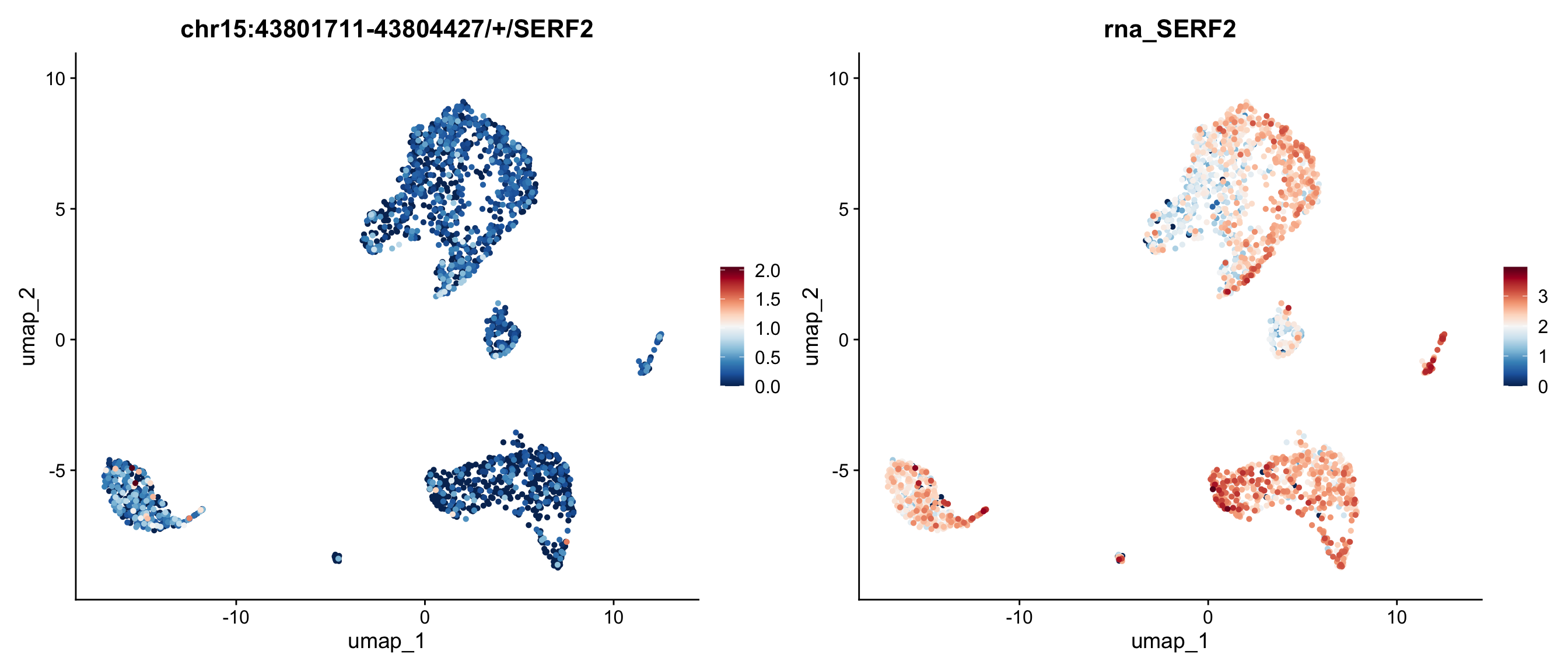
FeaturePlot(obj, features = c("chr15:43801711-43804427/+/SERF2", "SERF2"), ncol=2)

# The default color and parameters perhaps not easily to tell the difference between exon and its binding gene expression. Let's change the scaled colors and enlarge point size and order by expression.
require(RColorBrewer)
Loading required package: RColorBrewer
FeaturePlot(obj, features = c("chr15:43801711-43804427/+/SERF2", "SERF2"), ncol=2, order = TRUE, pt.size=1) & scale_colour_gradientn(colours = rev(brewer.pal(n = 11, name = "RdBu")))
Scale for colour is already present.
Adding another scale for colour, which will replace the existing scale.
Scale for colour is already present.
Adding another scale for colour, which will replace the existing scale.

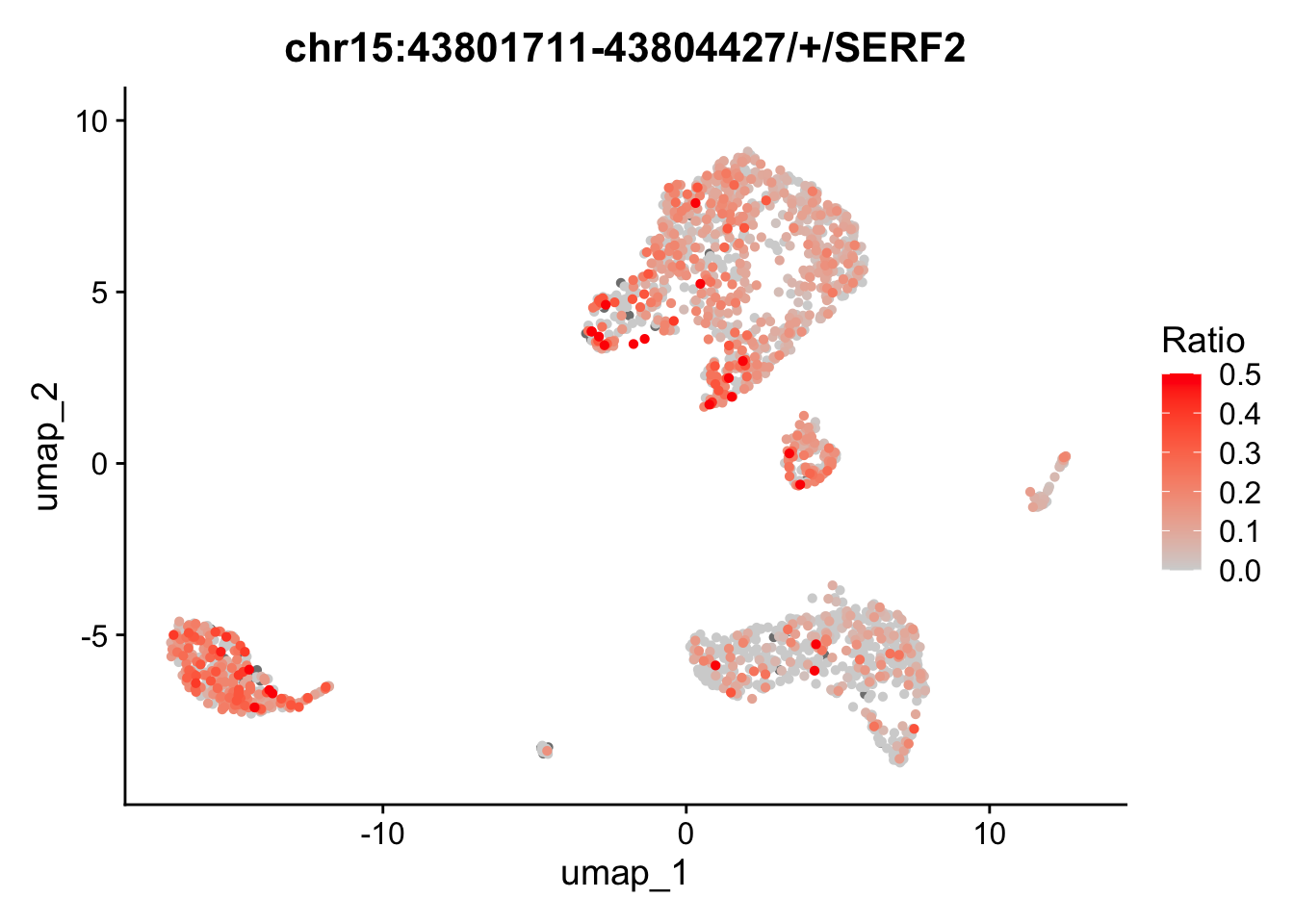
We can also map the ratio of exon expression to gene expression on the UMAP. The RatioPlot function is designed for this purpose. As observed, the gene SERF2 is relatively low expressed in some cell groups, while the ratio of the exon chr15:43801711-43804427/+/SERF2 is higher in these groups.

RatioPlot(obj, features = c("chr15:43801711-43804427/+/SERF2"), assay = 'exon', bind.assay = 'RNA', bind.name = "gene_name", order = TRUE, pt.size=1) 

In the feature plot and ratio plot above, the exon appears to lack a strong expression pattern across cell groups, whereas the gene SERF2 seems to be highly expressed in many groups, but with few exception. This inconsistent expression pattern between the exon and its corresponding gene may suggest differential exon usage. To explore the coverage details of both the exon and the gene body, we will generate a track plot next.

In our package, retrieving gene locations requires loading a GTF file instead of relying on current Bioconductor databases, such as org.Hs.eg.db. This is due to the varying versions of gene annotations provided by different institutes, which can introduce inconsistencies. To avoid potential bias during preprocessing and postprocessing, we strongly recommend using the same GTF file consistently throughout your project. The Yano package includes the gtf2db function, which enables you to load a GTF file into memory for further analysis.

gtf <- gtf2db("./gencode.v44.annotation.gtf.gz")
[2026-01-13 14:50:59] GTF loading..
[2026-01-13 14:51:43] Load 62700 genes.
[2026-01-13 14:51:43] Load time : 44.049 sec

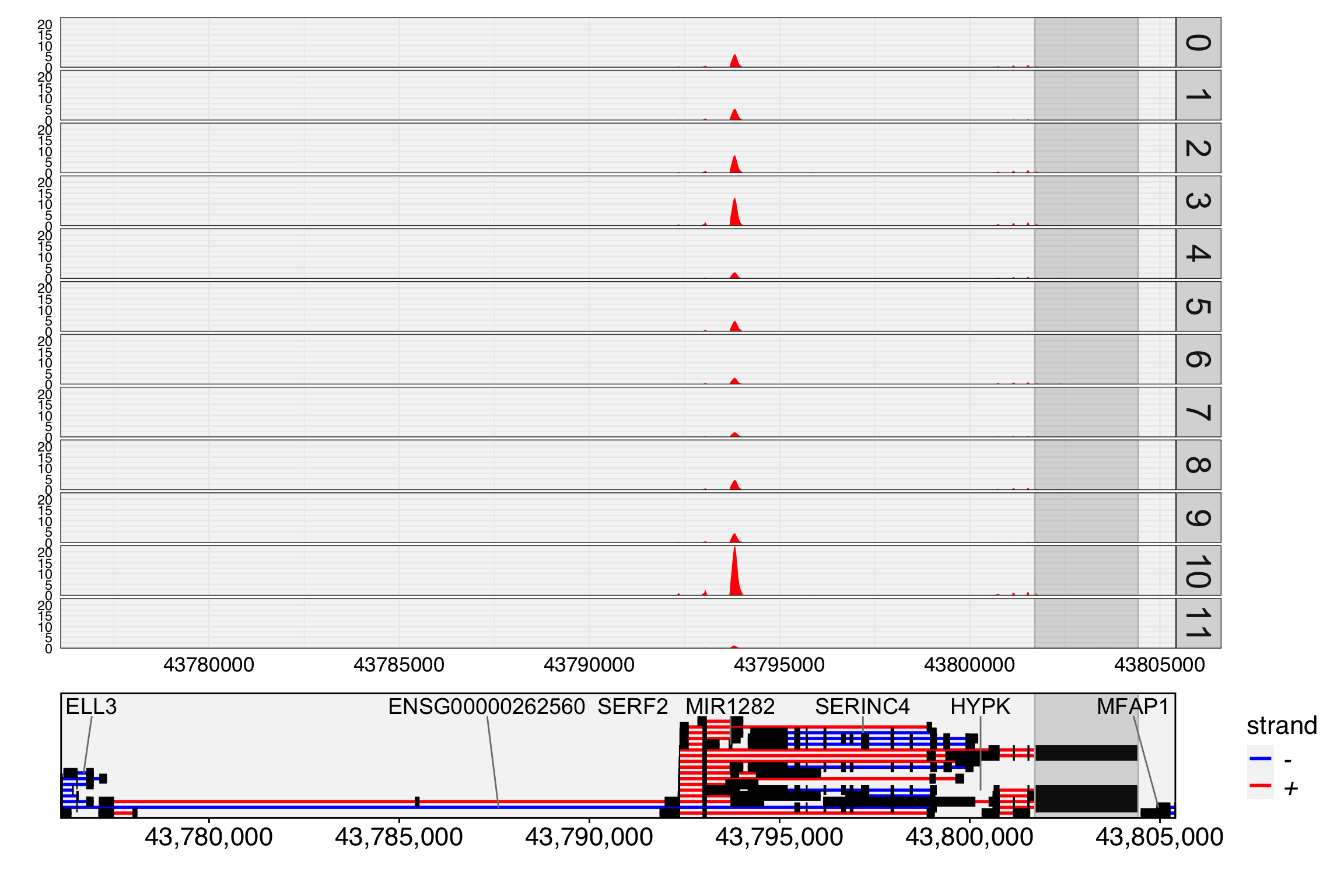
A track plot is used to study the read coverage per cell group. In the track plot shown below, the cell group is specified by the cell.group parameter. Unlike IGV, where read depth is used, we use UMI depth in this plot. The cell barcode tag and UMI tag are predefined as “CB” and “UB” with parameter cell.tag and umi.tag. For each cell group, the UMI depth has been normalized by the number of cells in that group. This means that the depth at each location can be interpreted as the mean UMI depth per cell for the group. As a result, the tracks are directly comparable across different cell groups. If cell.group is not set, the track plot will generate the raw UMI depth per location.

TrackPlot(bamfile = "Parent_SC3v3_Human_Glioblastoma_possorted_genome_bam.bam", gtf = gtf, gene = "SERF2", cell.group = Idents(obj), highlights = c(43801711,43804427) )
Warning: Using `size` aesthetic for lines was deprecated in ggplot2 3.4.0.
ℹ Please use `linewidth` instead.
ℹ The deprecated feature was likely used in the Yano package.
  Please report the issue to the authors.

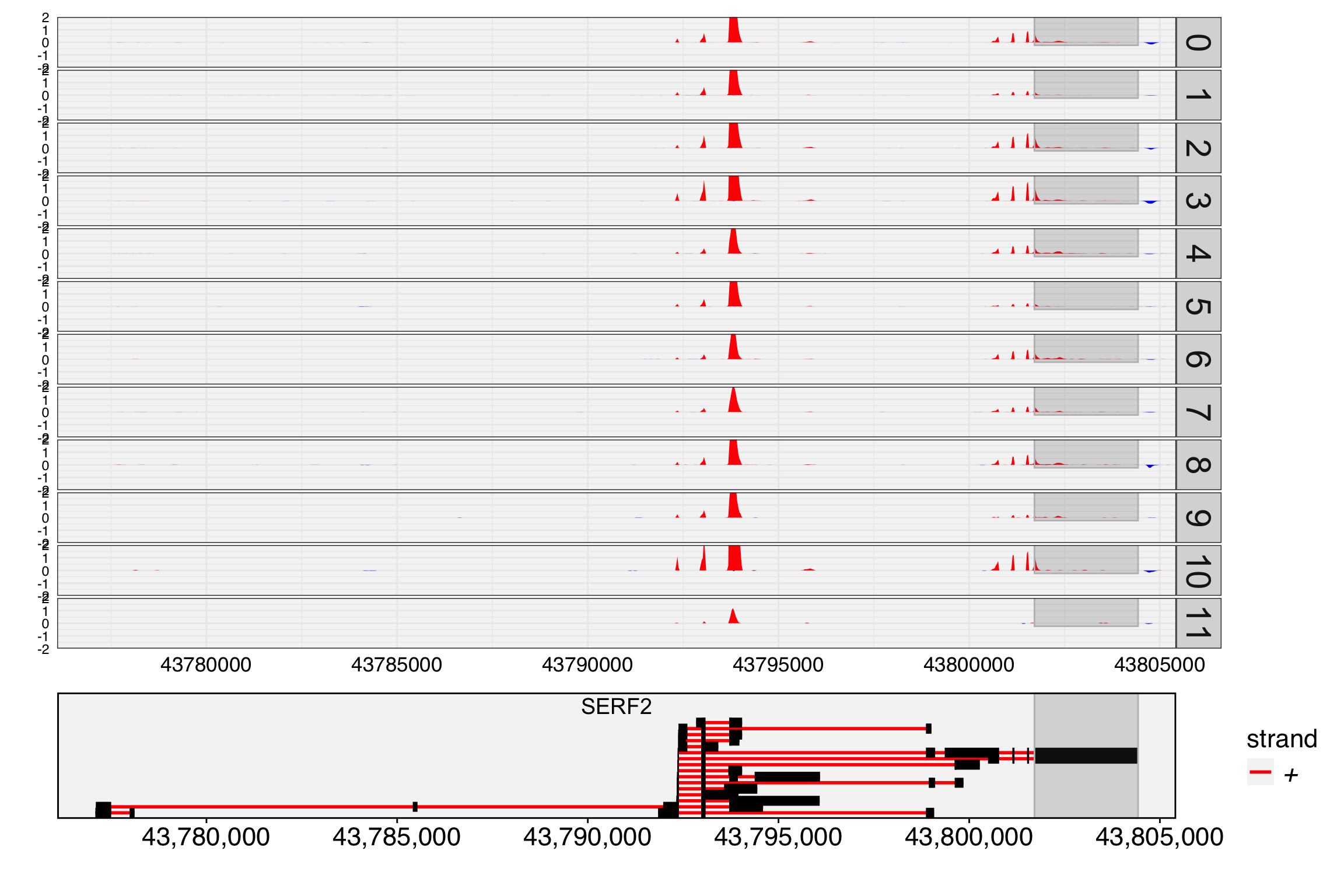
In the track plot, we can easily observe that an exon around position 43,794,000 dominates the expression of the SERF2 gene and is highly expressed in many cell groups. However, the exon ‘chr15:43801711-43804427/+/SERF2’ (highlighted) shows low expression and is not visible in the track plot. To visualize low-expressed exons, we can set the max.depth parameter to 2, which caps the UMI depth at 2. And many genes in the region, we set display.genes to SERF2 only. This adjustment allows the low-expressed exons and their related transcripts to be more clearly represented in the plot. In this case, we can found the the highlighed exon shows different expressed pattern with the gene SERF2.

TrackPlot(bamfile = "Parent_SC3v3_Human_Glioblastoma_possorted_genome_bam.bam", gtf = gtf, gene = "SERF2", cell.group = Idents(obj), highlights = c(43801711,43804427), max.depth = 2, display.genes = "SERF2")

3. Load junction assay

In addition to exon expression, junction expression can provide insights into different expression patterns across transcripts, offering a complementary perspective. Junction expression refers to the UMI counts of reads that span more than one exon. It’s important to note that junctions are named similarly to exons, but the start and end positions are different. The start of the junction corresponds to the end of the previous exon, while the end of the junction represents the start of the next exon.

junction <- ReadPISA("./junction/")
obj[['junction']] <- CreateAssayObject(junction[, colnames(obj)], min.cells=20)

DefaultAssay(obj) <- "junction"
obj <- NormalizeData(obj)

# select spatial autocorrelated junctions
obj <- RunAutoCorr(obj)
Working on assay : junction
Run autocorrelation test for 14754 features.
Runtime : 1.467701 secs
7505 autocorrelated features.
# Parse the gene name and coordinates from junction names
obj <- ParseExonName(obj)
Working on assay junction
# perform dissimilarity test between junctions and their binding genes
obj <- RunSDT(obj, bind.name = "gene_name", bind.assay = "RNA", perm=20)
Working on assay junction.
Working on binding assay RNA.
Use predefined weight matrix "pca_wm".
Processing 7505 features.
Processing 3753 binding features.
Retrieve binding data from assay RNA.
Use "data" layer for test features and binding features.
Using 63 threads.
Runtime : 5.708303 secs.
FbtPlot(obj, val="gene_name.padj", remove.chr=TRUE, sel.chrs = sel.chrs)

obj[['junction']][[]] %>% filter(gene_name.padj<1e-5)
                                moransi.pval   moransi autocorr.variable   chr
chr12:56160320-56161387/+/MYL6  0.000000e+00 0.1953176              TRUE chr12
chr15:43801569-43801711/+/SERF2 1.797608e-66 0.0766387              TRUE chr15
chr19:16093753-16095264/+/TPM4  0.000000e+00 0.1823960              TRUE chr19
                                   start      end gene_name strand gene_name.D
chr12:56160320-56161387/+/MYL6  56160320 56161387      MYL6      +   0.6477157
chr15:43801569-43801711/+/SERF2 43801569 43801711     SERF2      +   0.3129913
chr19:16093753-16095264/+/TPM4  16093753 16095264      TPM4      +   0.5164832
                                gene_name.t gene_name.pval gene_name.padj
chr12:56160320-56161387/+/MYL6   -13.412033   1.936218e-11   7.265658e-08
chr15:43801569-43801711/+/SERF2   -9.996156   2.647860e-09   6.624064e-06
chr19:16093753-16095264/+/TPM4   -16.044855   8.370662e-13   6.282182e-09
# Because both exon and junction are compared with gene, so it's reasonable to combine these two assays in one plot
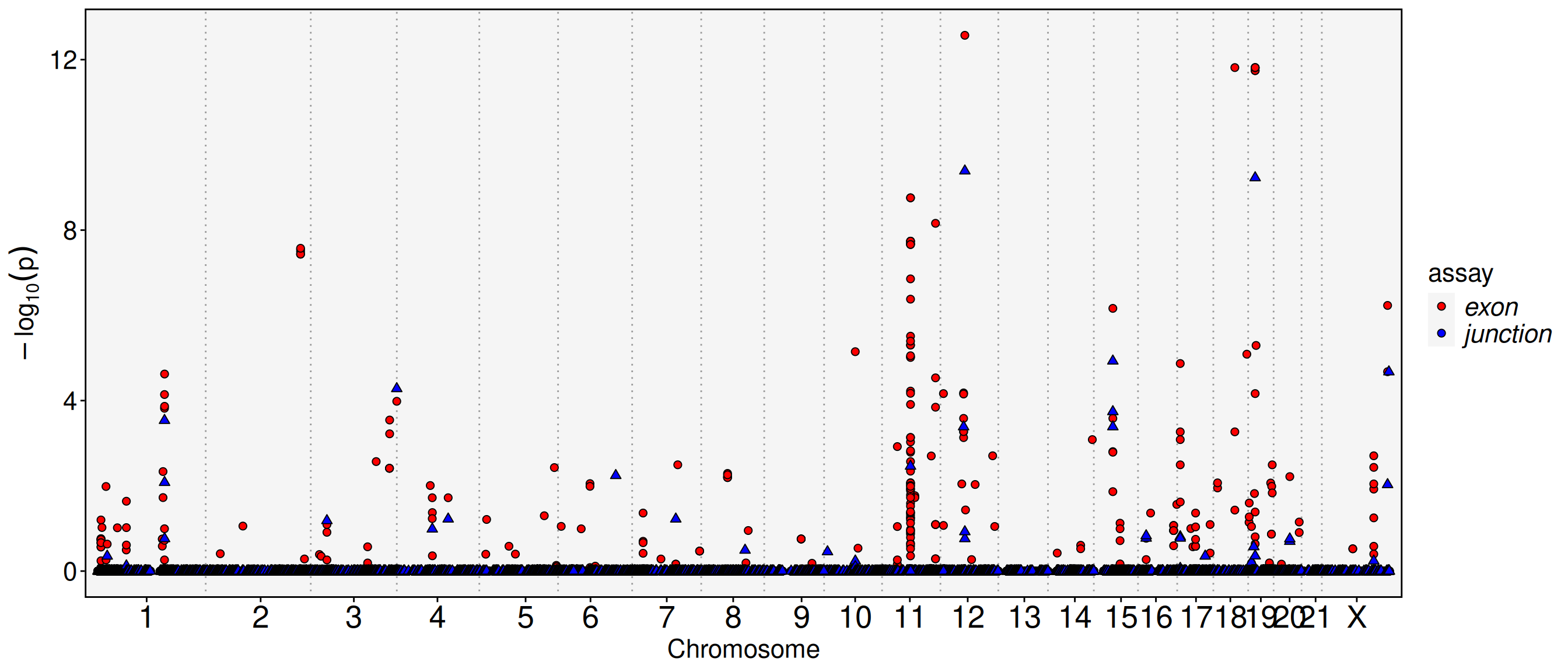
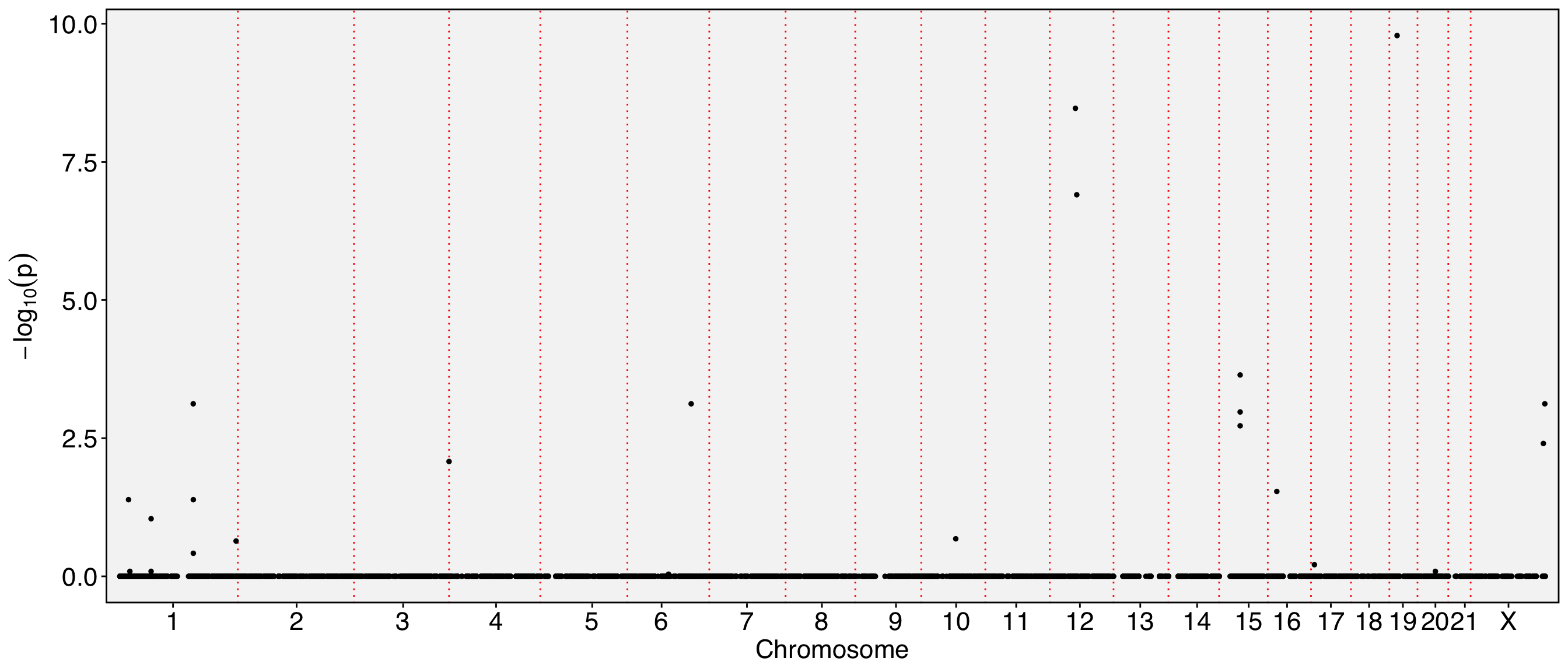
FbtPlot(obj, val="gene_name.padj", assay = c("exon", "junction"), col.by = "assay", shape.by = "assay", pt.size = 2, remove.chr = TRUE, sel.chrs = sel.chrs, cols = c("red", "blue"))

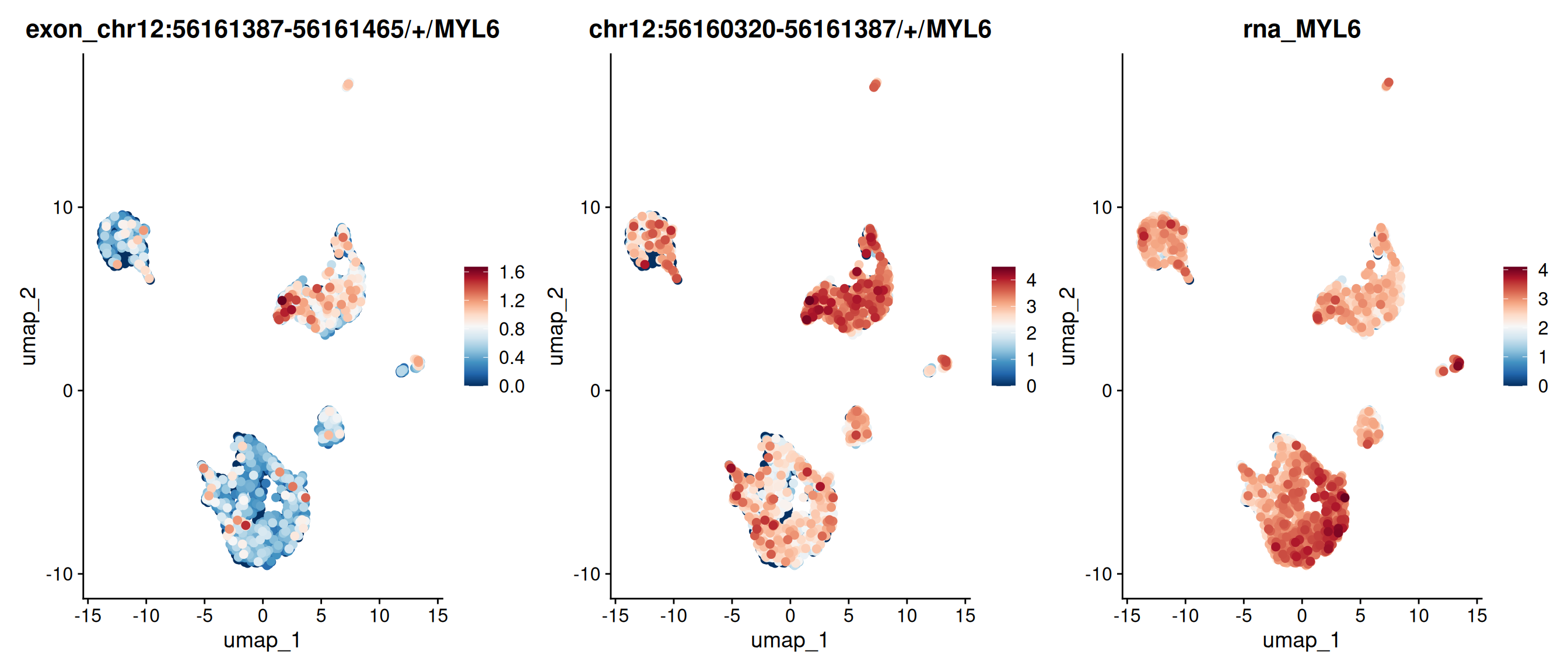
# We can find there is an exon and a junction at chromosome 12 with very low p value (<1e-8), let's see which gene they are located
obj[['exon']][[]] %>% filter(chr == "chr12" & gene_name.pval < 1e-8) %>% knitr::kable()
chr start end gene_name strand moransi.pval moransi autocorr.variable gene_name.D gene_name.t gene_name.pval gene_name.padj
chr12:53306966-53307171/+/ENSG00000288663 chr12 53306966 53307171 ENSG00000288663 + 0 0.0240766 TRUE 0.2937248 -10.010381 0 5.4e-06
chr12:53306966-53307158/+/ENSG00000288663 chr12 53306966 53307158 ENSG00000288663 + 0 0.0237021 TRUE 0.2942330 -9.694383 0 8.8e-06
chr12:53306966-53307174/+/ENSG00000288663 chr12 53306966 53307174 ENSG00000288663 + 0 0.0241618 TRUE 0.2948391 -10.028097 0 5.4e-06
chr12:56161387-56161465/+/MYL6 chr12 56161387 56161465 MYL6 + 0 0.2502209 TRUE 0.6833002 -17.879907 0 0.0e+00
obj[['junction']][[]] %>% filter(chr == "chr12" & gene_name.pval < 1e-8) %>% knitr::kable()
moransi.pval moransi autocorr.variable chr start end gene_name strand gene_name.D gene_name.t gene_name.pval gene_name.padj
chr12:56160320-56161387/+/MYL6 0 0.1953176 TRUE chr12 56160320 56161387 MYL6 + 0.6477157 -13.41203 0 1e-07
FeaturePlot(obj, features = c("chr12:56161387-56161465/+/MYL6","chr12:56160320-56161387/+/MYL6", "MYL6"), order = TRUE, pt.size = 2, ncol=3) & scale_colour_gradientn(colours = rev(brewer.pal(n = 11, name = "RdBu")))
Scale for colour is already present.
Adding another scale for colour, which will replace the existing scale.
Scale for colour is already present.
Adding another scale for colour, which will replace the existing scale.
Scale for colour is already present.
Adding another scale for colour, which will replace the existing scale.

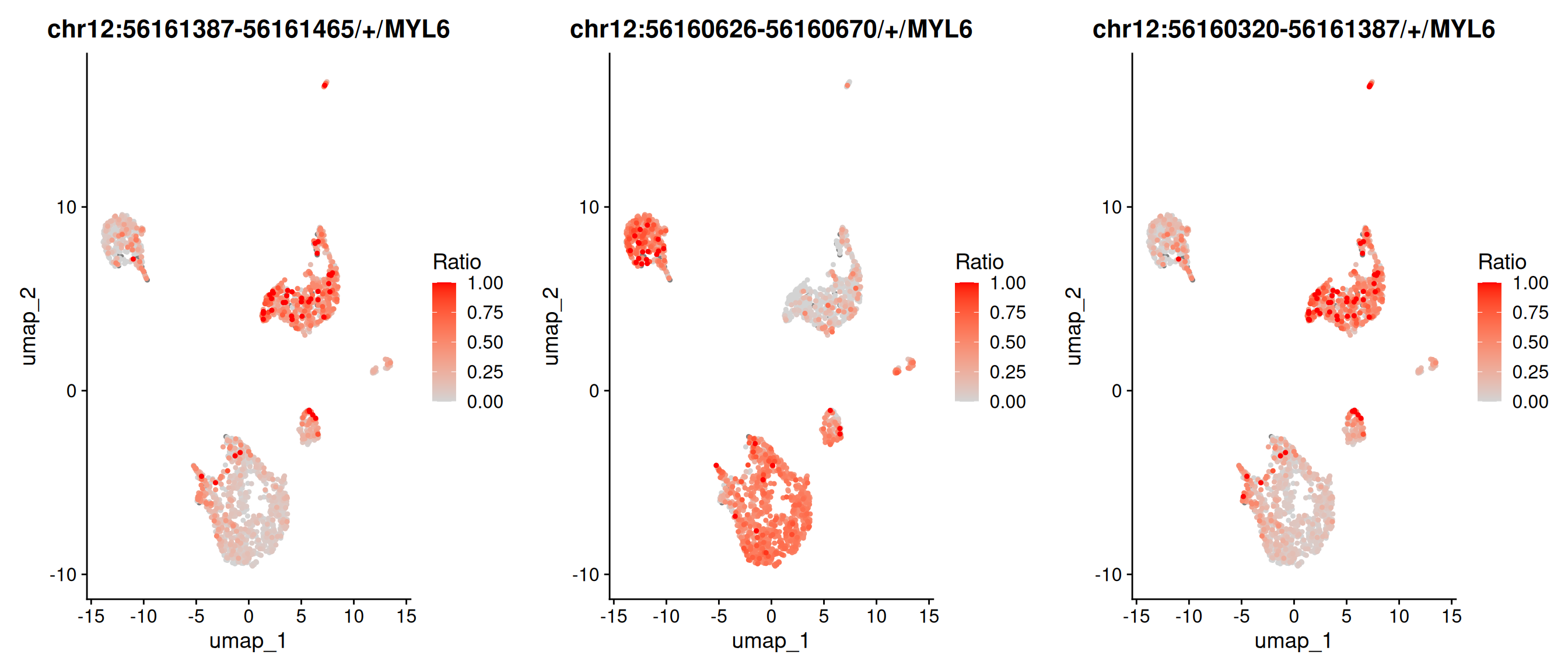
# We could also plot the expression ratio of these exons or junctions on umap
p1 <- RatioPlot(obj, assay = "exon", bind.assay = "RNA", bind.name = "gene_name", features = "chr12:56161387-56161465/+/MYL6")
p2 <- RatioPlot(obj, assay = "exon", bind.assay = "RNA", bind.name = "gene_name", features = "chr12:56160626-56160670/+/MYL6")
p3 <- RatioPlot(obj, assay = "junction", bind.assay = "RNA", bind.name = "gene_name", features = "chr12:56160320-56161387/+/MYL6")
cowplot::plot_grid(p1,p2,p3, ncol=3)

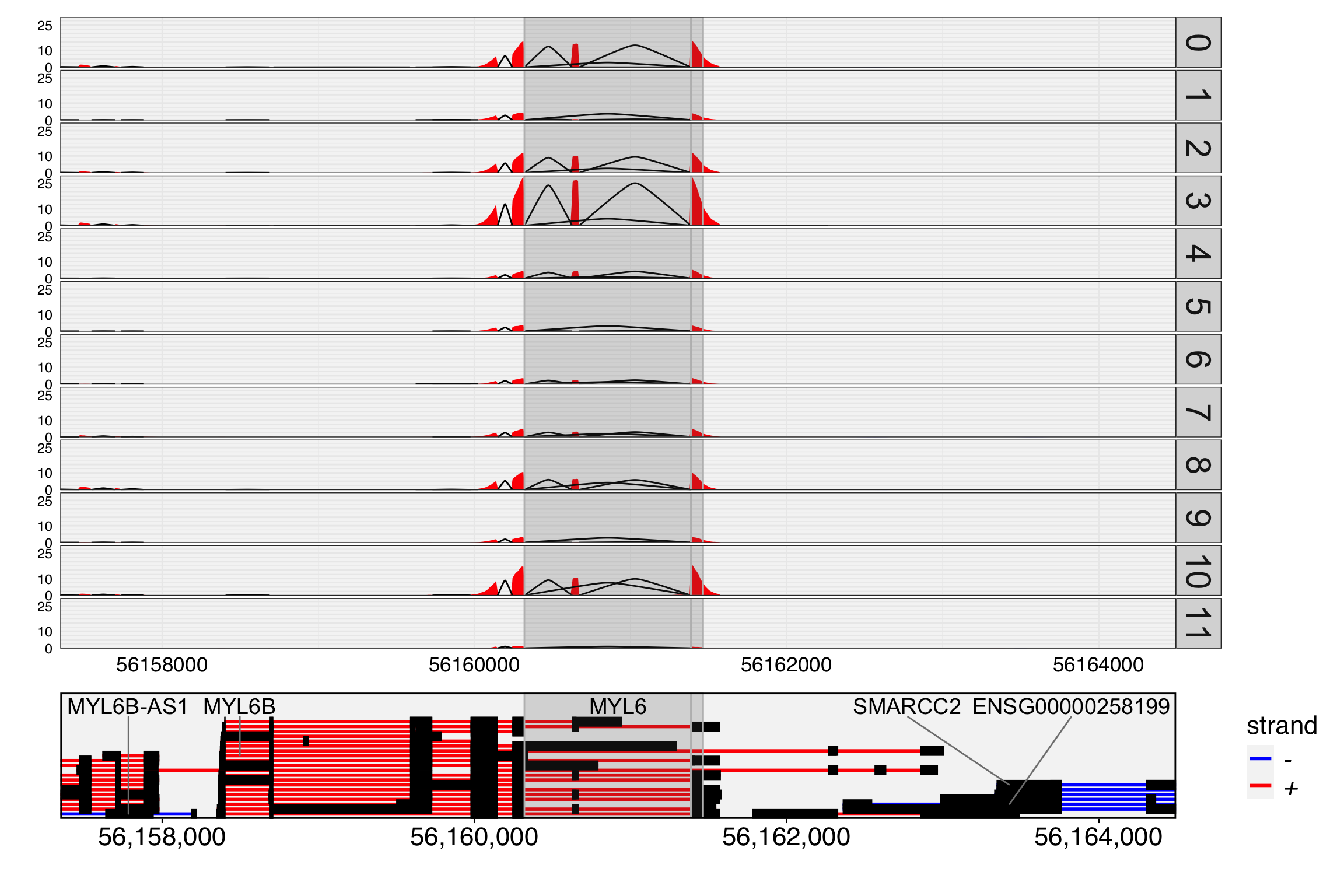
We then visualize the track plot for this gene, including junction reads by setting junc=TRUE. The height of the splice paths in the plot represents the expression level of each junction within the specified cell group.

TrackPlot(bamfile = "Parent_SC3v3_Human_Glioblastoma_possorted_genome_bam.bam", gtf = gtf, gene = "MYL6", cell.group = Idents(obj), junc = TRUE, highlights = list(c(56160320,56161387),c(56161387,56161465)))

You might be wondering why the exon chr12:56161387-56161465/+/MYL6 appears highly expressed in cell group 3 in the track plot, where the overlapping peak is clearly higher than in other groups, but its expression level in the feature plot is not as high as expected.

This discrepancy arises because the exon is overlapping with other exons from different transcripts. We only count reads that are fully contained within the exon as part of the exon’s expression. Therefore, reads that partially overlap with this exon are not included in the count.

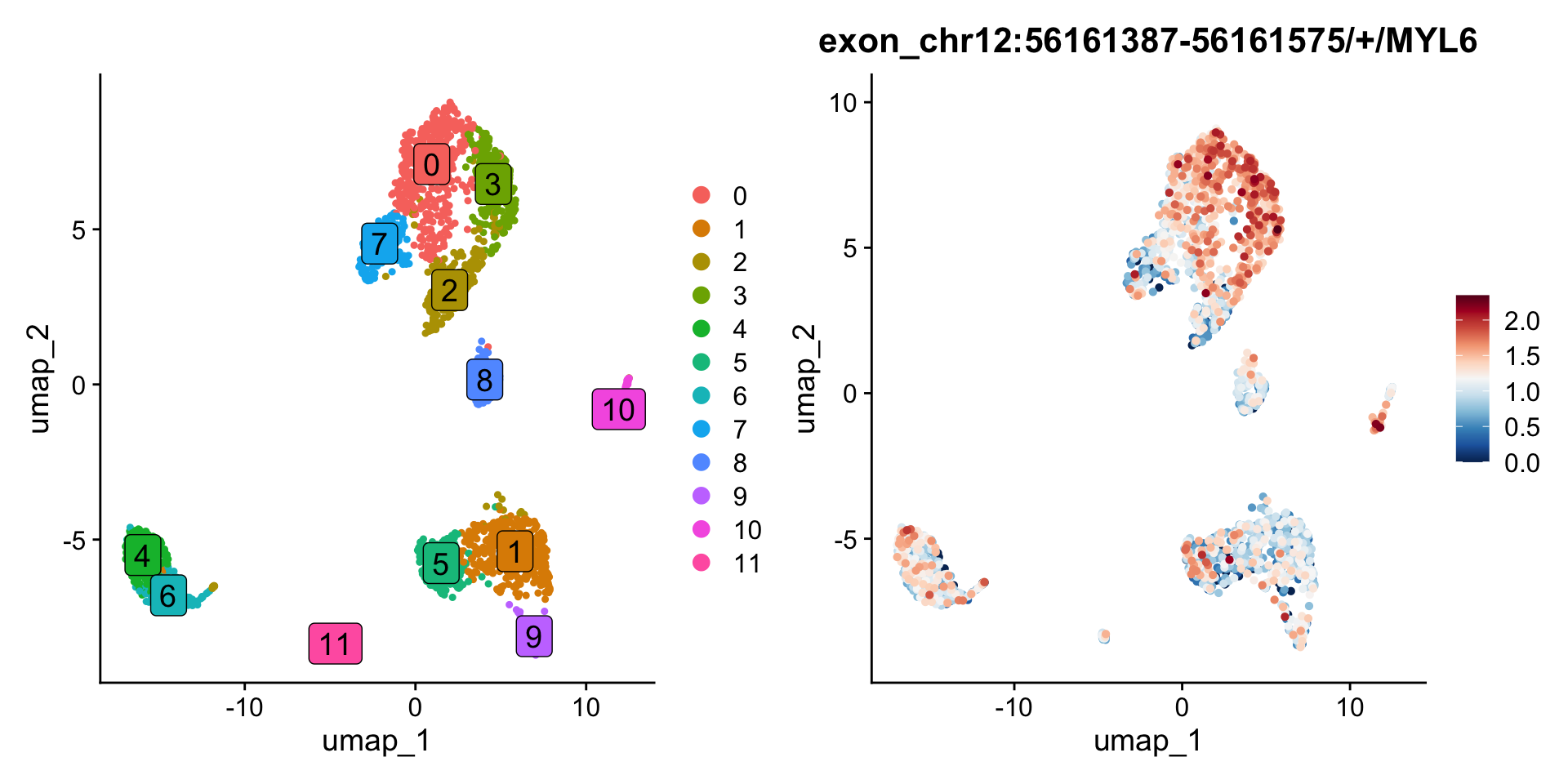
In contrast, the overlapping exon chr12:56161387-56161575/+/MYL6 shows higher expression in group 3 compared to other groups. It’s important to note that if a read is fully contained within two or more overlapping exons, PISA will count it for all relevant exons. Check PISA’s manual for details.

p1 <- DimPlot(obj, label=TRUE, label.size = 5, label.box = TRUE)
p2 <- FeaturePlot(obj, features = c("chr12:56161387-56161575/+/MYL6"), order = TRUE, pt.size = 1) & scale_colour_gradientn(colours = rev(brewer.pal(n = 11, name = "RdBu")))
Warning: Could not find chr12:56161387-56161575/+/MYL6 in the default search
locations, found in 'exon' assay instead
Scale for colour is already present.
Adding another scale for colour, which will replace the existing scale.
p1 + p2

4. Heatmap analysis for highlight group specific alternative splicing

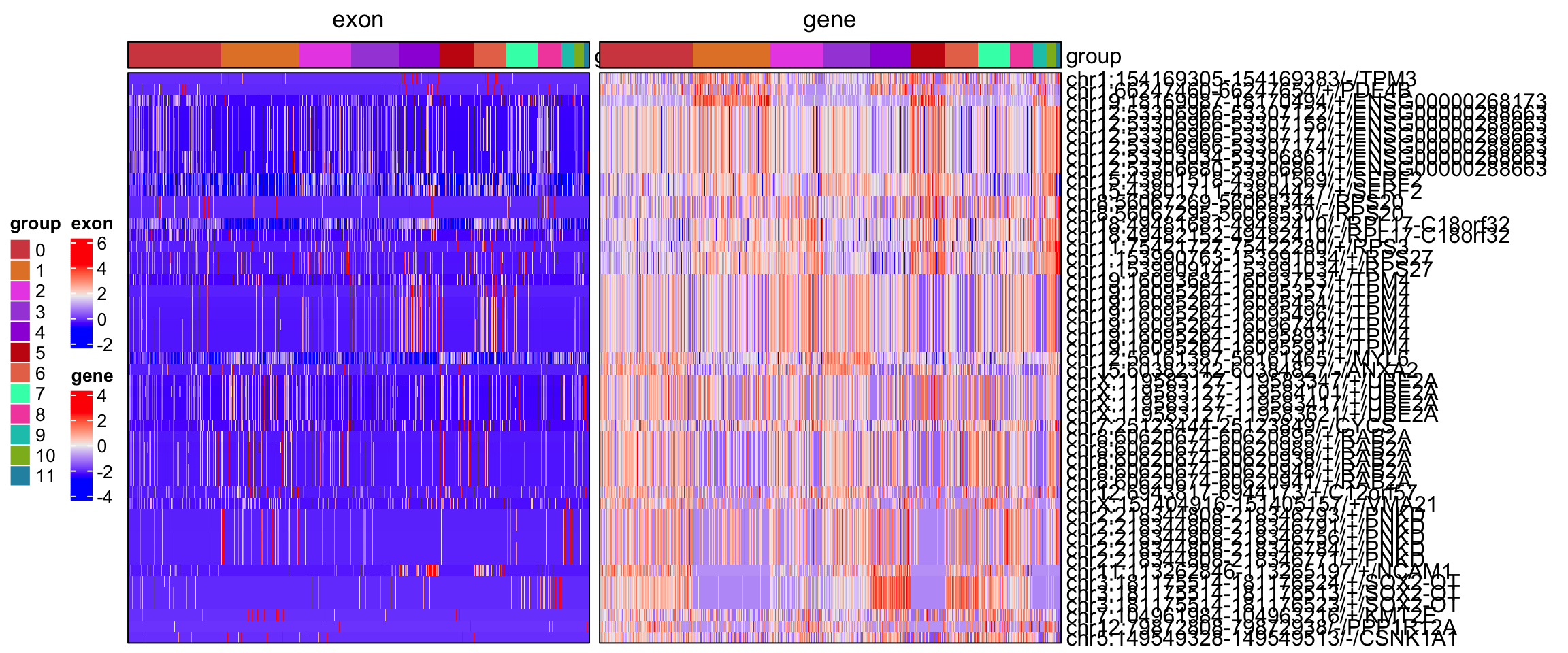
The spatial dissimilarity test method prioritizes alternatively spliced exons and junctions across all cells but does not identify which specific cell groups exhibit these splicing events. To address this, let’s manually extract the scaled expression data for the selected alternatively spliced exons and their corresponding genes, then perform a co-clustering analysis. A comprehensive heatmap will be generated using the ComplexHeatmap package, providing a visual representation of the exon and gene distribution across cell groups.

obj[['exon']][[]] %>% filter(gene_name.padj<0.001) %>% rownames -> exons
obj[['exon']][[]] %>% filter(gene_name.padj<0.001) %>% pull(gene_name) -> bind.genes
DefaultAssay(obj) <- "RNA"
obj <- ScaleData(obj, features = unique(bind.genes))
DefaultAssay(obj) <- "exon"
obj <- ScaleData(obj, features = exons)

dat1 <- GetAssayData(obj, assay = 'exon', layer = 'scale.data')
dat2 <- GetAssayData(obj, assay = 'RNA', layer = 'scale.data')
idents <- sort(Idents(obj))
order.cells <- names(idents)

dat2 <- dat2[bind.genes,]
rownames(dat2) <- exons

dat <- cbind(dat1, dat2)

require(ComplexHeatmap)
d <- dist(dat)
hc <- hclust(d)
idx <- hc$labels[hc$order]

ha <- HeatmapAnnotation(group=idents, border = TRUE)
ht1 <- Heatmap(dat1[idx, order.cells], cluster_rows = FALSE, cluster_columns = FALSE, show_column_names = FALSE, border = TRUE,  top_annotation = ha, name = "exon", column_title = "exon")
ht2 <- Heatmap(dat2[idx, order.cells], cluster_rows = FALSE, cluster_columns = FALSE, show_column_names = FALSE, border = TRUE,  top_annotation = ha, name = "gene", column_title = "gene", row_names_max_width = max_text_width(rownames(dat2), gp = gpar(fontsize = 12)))

ht <- ht1 + ht2
draw(ht, heatmap_legend_side = "left",  annotation_legend_side = "left")

5. Test between exon and exon skipped reads

In the previous sections, we conducted a spatial dissimilarity test between exon/junction expression and gene expression. However, binding features are not always limited to genes; they can also correspond to other types of features. In this section, we perform a test between exon expression and reads that skip this exon (exclude assay). This approach is similar to the Percent Spliced In (PSI) method, which is widely used to analyze alternative splicing in both bulk and single-cell RNA-seq data. The PSI is calculated as: PSI = exon reads / (exon reads + reads skipping this exon).

# The reads that skip exons are annotated using the `-psi` option in PISA anno, and these counts are stored in the `exclude` directory. We then load these excluded counts into a new assay.
exclude <- ReadPISA("exclude/")
obj[['exclude']] <- CreateAssayObject(exclude[,colnames(obj)], min.cells = 10)
DefaultAssay(obj) <- "exclude"
# Normalize counts for exon-excluded reads
obj <- NormalizeData(obj)
# Then we switch to exon assay
DefaultAssay(obj) <- "exon"

# Because the feature names in the exclude assay are exactly the same as those in the exon assay, they represent the reads that skip each corresponding exon. Therefore, we set up the binding feature using the exon name itself.
obj[['exon']][['exon_name']] <- rownames(obj)
obj[['exon']][['exon_name']] %>% head
                                                                exon_name
chr1:135141-135895/-/ENSG00000268903 chr1:135141-135895/-/ENSG00000268903
chr1:629640-630683/+/MTND2P28               chr1:629640-630683/+/MTND2P28
chr1:631074-632616/+/MTCO1P12               chr1:631074-632616/+/MTCO1P12
chr1:632757-633438/+/MTCO2P12               chr1:632757-633438/+/MTCO2P12
chr1:633696-634376/+/MTATP6P1               chr1:633696-634376/+/MTATP6P1
chr1:634376-634922/+/MTCO3P12               chr1:634376-634922/+/MTCO3P12
# Then we perform spatial dissimilarity test between exon and exclude, mode 1
obj <- RunSDT(obj, bind.name = "exon_name", bind.assay = "exclude")

# Swith to exon exluded assay
DefaultAssay(obj) <- "exclude"
obj <- RunAutoCorr(obj)
obj <- ParseExonName(obj)
obj[['exclude']][['exon_name']] <- rownames(obj)

obj <- RunSDT(obj, bind.name = "exon_name", bind.assay = "exon")

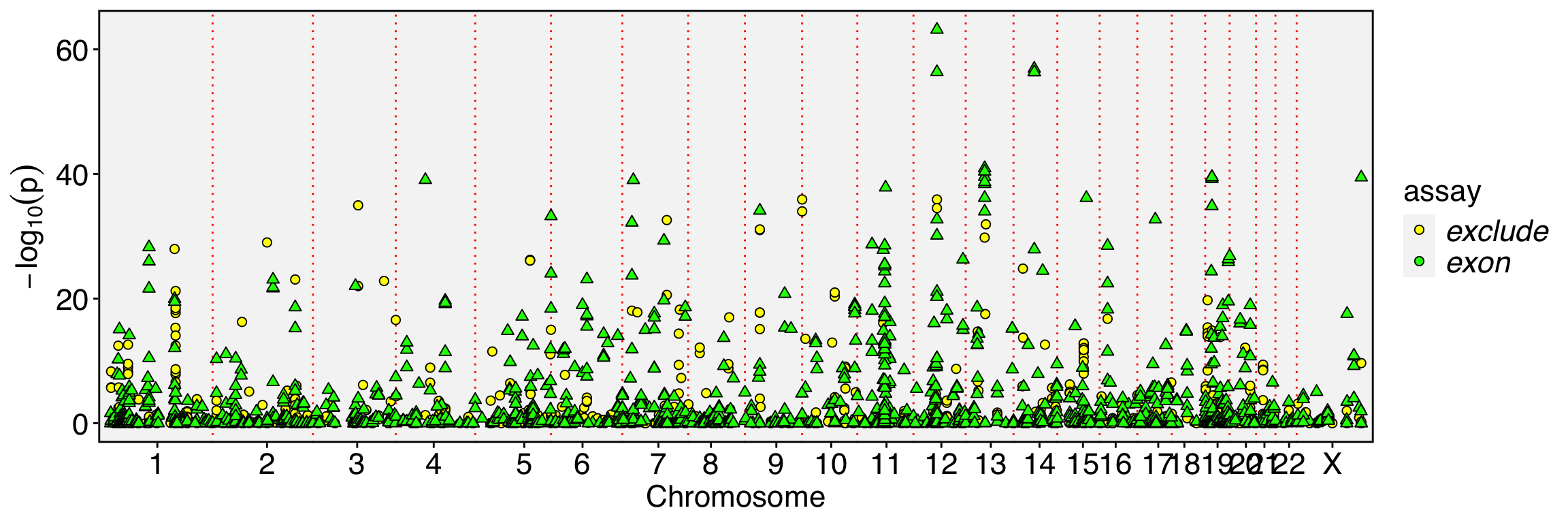
FbtPlot(obj, val = "exon_name.padj", remove.chr = TRUE, assay = c("exclude", "exon"), shape.by = "assay", col.by = "assay", cols = c("yellow", "green"), pt.size = 2)

# Let's how many exons can be prioritized by both exon assay and exclude assay
obj[['exclude']][[]] %>% filter(exon_name.padj<1e-5) %>% rownames -> sel1
obj[['exon']][[]] %>% filter(exon_name.padj<1e-5) %>% rownames -> sel2
intersect(sel1,sel2)
 [1] "chr1:19342752-19342864/-/CAPZB"    "chr1:153990914-153991034/+/RPS27" 
 [3] "chr10:7806974-7807010/+/ATP5F1C"   "chr10:128047570-128047683/+/PTPRE"
 [5] "chr12:56160626-56160670/+/MYL6"    "chr12:56160626-56160945/+/MYL6"   
 [7] "chr14:75279237-75279531/+/FOS"     "chr15:29822002-29822468/-/TJP1"   
 [9] "chr15:29822002-29822503/-/TJP1"    "chr15:29822002-29822502/-/TJP1"   
[11] "chr19:16095264-16095357/+/TPM4"    "chr19:16095264-16095454/+/TPM4"   
[13] "chr19:16095264-16095496/+/TPM4"    "chr19:16095264-16095893/+/TPM4"   
[15] "chr19:16095264-16096744/+/TPM4"    "chr19:16095264-16095591/+/TPM4"   
[17] "chr2:197490527-197490664/-/HSPD1"  "chr20:37238402-37238449/+/RPN2"   
[19] "chr3:197953488-197953660/+/RPL35A" "chr4:118278944-118279137/+/SNHG8" 
[21] "chr4:118278934-118279137/+/SNHG8"  "chr4:118279107-118279137/+/SNHG8" 
[23] "chr4:118278966-118279137/+/SNHG8"  "chr5:83519349-83522309/+/VCAN"    
[25] "chr6:85677795-85677875/-/SNHG5"    "chr6:85677795-85677868/-/SNHG5"   
[27] "chr6:85677791-85677875/-/SNHG5"    "chr6:85677795-85677899/-/SNHG5"   
[29] "chr9:35684732-35684807/-/TPM2"     "chr9:35684732-35684802/-/TPM2"    
[31] "chrX:154400464-154400626/+/RPL10" 
DefaultAssay(obj) <- "exclude"
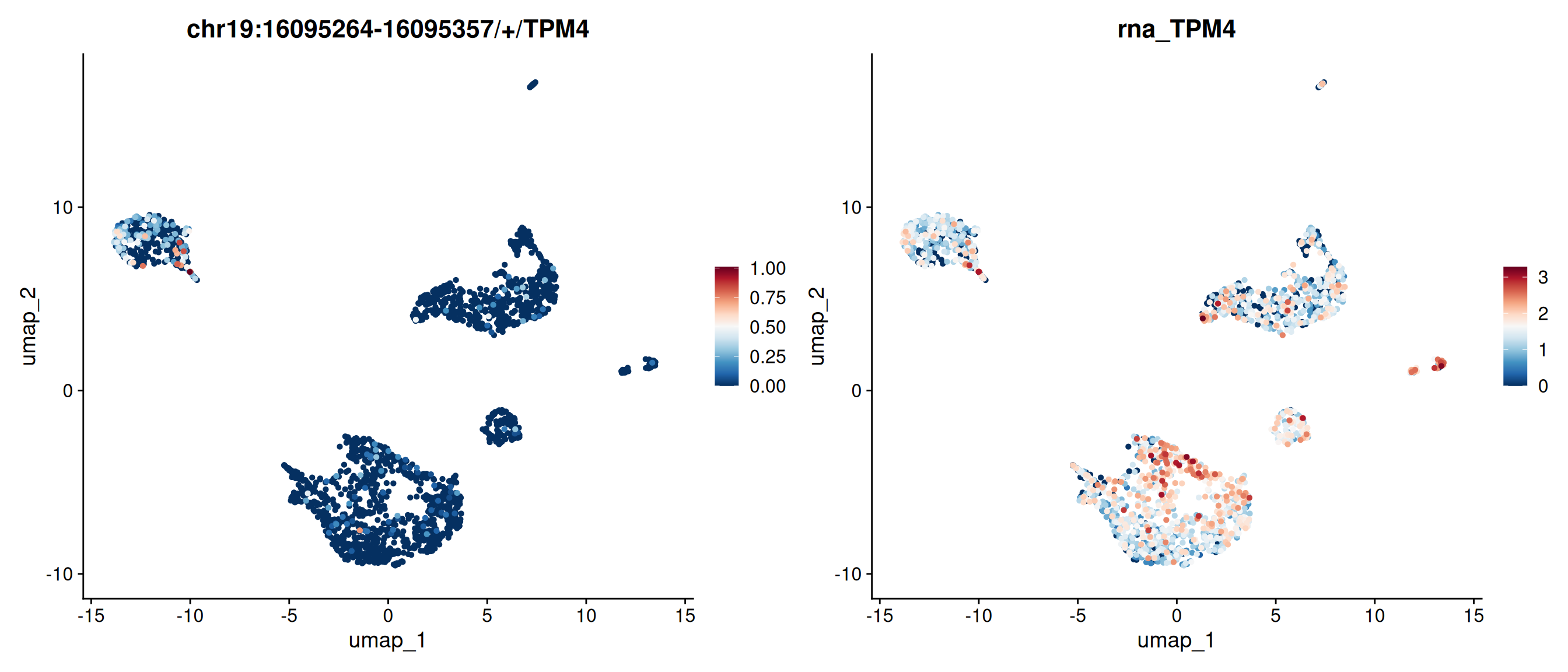
p1 <- FeaturePlot(obj, features = c("chr19:16095264-16095357/+/TPM4"),order = TRUE)
DefaultAssay(obj) <- "exon"
p2 <- FeaturePlot(obj, features = c("chr19:16095264-16095357/+/TPM4"),order = TRUE)
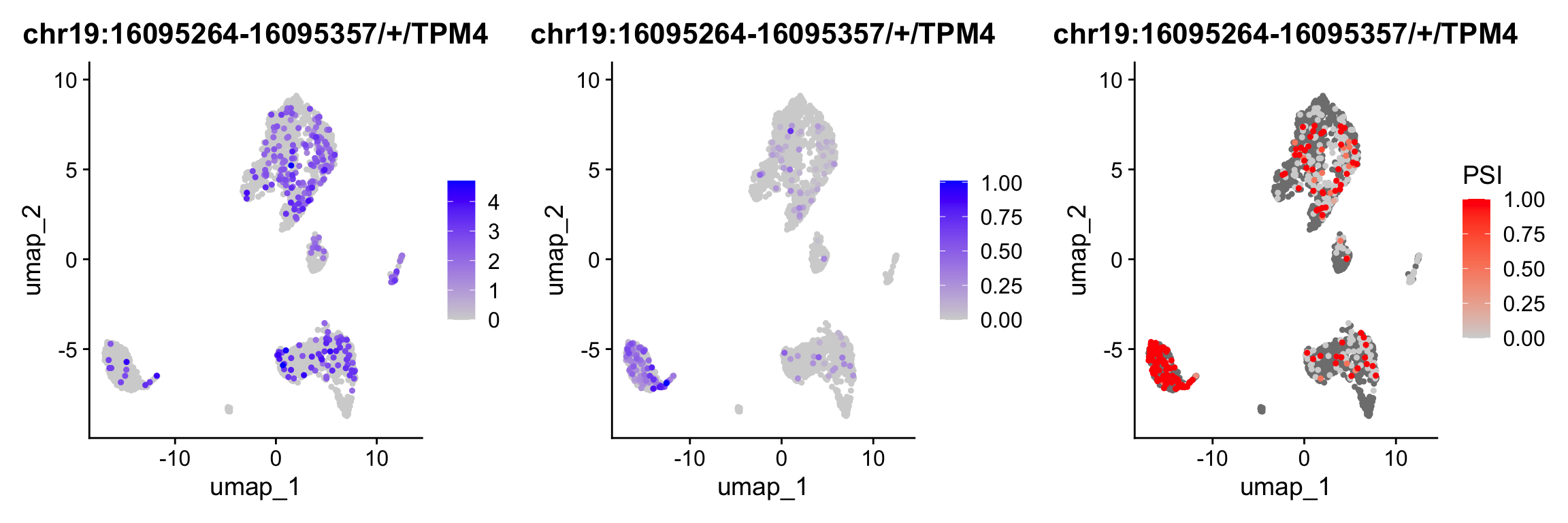
p3 <- PSIPlot(obj, exon.assay = "exon", exclude.assay = "exclude", features = c("chr19:16095264-16095357/+/TPM4"),order = TRUE)
cowplot::plot_grid(p1,p2,p3, ncol=3)

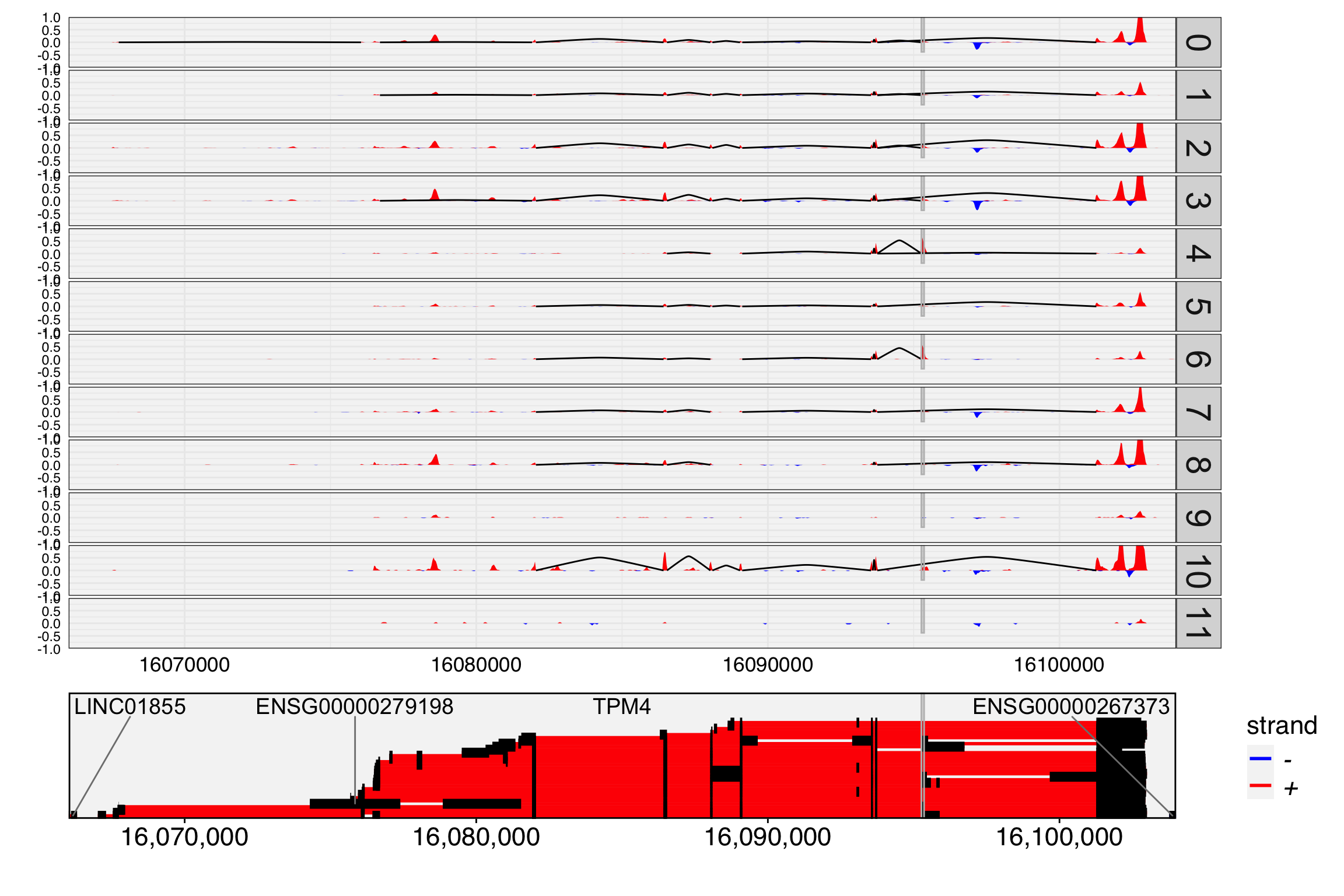
TrackPlot(bamfile = "Parent_SC3v3_Human_Glioblastoma_possorted_genome_bam.bam", gtf = gtf, gene = "TPM4", cell.group = Idents(obj), highlights = c(16095264,16095357), junc = TRUE, max.depth = 1)

In previous sections, we noted that exon or junction expression is part of gene expression, and inverse expression patterns can strongly indicate alternative splicing. However, exon-skipped reads are largely independent of exon expression, making them more sensitive for detecting alternative splicing and allowing for the prioritization of many events.

Because our spatial dissimilarity test does not account for the spatial dependency of the binding feature, numerous events may be prioritized, especially when the binding feature is sparsely expressed. While some of these events may be true, others might arise due to low coverage. To enhance detection power and reduce potential false positives, intersecting the prioritized exons with the prioritized exon-excluded features can help refine the results.

Mode 3 can be used as an alternative to mode 1 to specifically detect events with strong inverse expression patterns. In mode 3, the exon reads and exon-excluded reads are summed as the binding assay, allowing for a more targeted analysis of such patterns. It is important to note that events detected with mode 3 are always detectable with mode 1, making mode 3 a refined approach for prioritizing inverse expression events.

DefaultAssay(obj) <- "exclude"
obj <- RunSDT(obj, bind.name = "exon_name", bind.assay = "exon", mode = 3, prefix = "mode3")
DefaultAssay(obj) <- "exon"
obj <- RunSDT(obj, bind.name = "exon_name", bind.assay = "exclude", mode = 3, prefix = "mode3")
FbtPlot(obj, val = "mode3.padj", remove.chr = TRUE, assay = c("exclude", "exon"), shape.by = "assay", col.by = "assay", pt.size = 2, cols=c("yellow", "green"))

In this case study, we performed a spatial dissimilarity test between various feature pairs. This method provides an overview of the entire cell population and does not rely on prior cell clustering and annotation, making it a powerful tool for analyzing cell data without any prior knowledge. It is recommended to test different features including junctions and exons, and set up different with their corresponding genes in 3’ or 5’ biased scRNA-seq. Additionally, testing between exon-included and exon-skipped reads have more power to detect exon excluded events.

To obtain cell-cluster-specific expression patterns, applying heatmaps and clustering in subsequent analyses is recommended.

Questions?

If you have any questions regarding this vignette and the usage of Yano, please feel free to report them through the discussion forum. When submitting your query, please ensure you attach the commands you used for better clarity and support.
Command(obj)
 [1] "NormalizeData.RNA"            "FindVariableFeatures.RNA"    
 [3] "RunPCA.RNA"                   "FindNeighbors.RNA.pca"       
 [5] "FindClusters"                 "RunUMAP.RNA.pca"             
 [7] "ParseExonName.exon"           "NormalizeData.exon"          
 [9] "RunAutoCorr.exon.pca"         "SetAutoCorrFeatures.exon"    
[11] "NormalizeData.junction"       "RunAutoCorr.junction.pca"    
[13] "SetAutoCorrFeatures.junction" "ParseExonName.junction"      
[15] "RunSDT.junction"              "ScaleData.RNA"               
[17] "ScaleData.exon"               "NormalizeData.exclude"       
[19] "RunAutoCorr.exclude.pca"      "SetAutoCorrFeatures.exclude" 
[21] "ParseExonName.exclude"        "RunSDT.exclude"              
[23] "RunSDT.exon"                 
sessionInfo()
R version 4.5.2 (2025-10-31)
Platform: x86_64-pc-linux-gnu
Running under: Ubuntu 22.04.5 LTS

Matrix products: default
BLAS:   /usr/lib/x86_64-linux-gnu/openblas-pthread/libblas.so.3 
LAPACK: /usr/lib/x86_64-linux-gnu/openblas-pthread/libopenblasp-r0.3.20.so;  LAPACK version 3.10.0

locale:
 [1] LC_CTYPE=C.UTF-8       LC_NUMERIC=C           LC_TIME=C.UTF-8       
 [4] LC_COLLATE=C.UTF-8     LC_MONETARY=C.UTF-8    LC_MESSAGES=C.UTF-8   
 [7] LC_PAPER=C.UTF-8       LC_NAME=C              LC_ADDRESS=C          
[10] LC_TELEPHONE=C         LC_MEASUREMENT=C.UTF-8 LC_IDENTIFICATION=C   

time zone: Etc/UTC
tzcode source: system (glibc)

attached base packages:
[1] grid      stats     graphics  grDevices utils     datasets  methods  
[8] base     

other attached packages:
[1] ComplexHeatmap_2.25.2 RColorBrewer_1.1-3    future_1.67.0        
[4] dplyr_1.1.4           Seurat_5.3.0          SeuratObject_5.2.0   
[7] sp_2.2-0              ggplot2_4.0.0         Yano_1.2             

loaded via a namespace (and not attached):
  [1] shape_1.4.6.1          jsonlite_2.0.0         magrittr_2.0.4        
  [4] magick_2.9.0           spatstat.utils_3.2-0   farver_2.1.2          
  [7] rmarkdown_2.30         GlobalOptions_0.1.3    vctrs_0.6.5           
 [10] ROCR_1.0-11            spatstat.explore_3.5-3 htmltools_0.5.8.1     
 [13] sctransform_0.4.2      parallelly_1.45.1      KernSmooth_2.23-26    
 [16] htmlwidgets_1.6.4      ica_1.0-3              plyr_1.8.9            
 [19] plotly_4.11.0          zoo_1.8-14             igraph_2.2.0          
 [22] mime_0.13              lifecycle_1.0.4        iterators_1.0.14      
 [25] pkgconfig_2.0.3        Matrix_1.7-4           R6_2.6.1              
 [28] fastmap_1.2.0          clue_0.3-66            fitdistrplus_1.2-4    
 [31] shiny_1.11.1           digest_0.6.37          colorspace_2.1-2      
 [34] S4Vectors_0.46.0       patchwork_1.3.2        tensor_1.5.1          
 [37] RSpectra_0.16-2        irlba_2.3.5.1          labeling_0.4.3        
 [40] progressr_0.17.0       spatstat.sparse_3.1-0  httr_1.4.7            
 [43] polyclip_1.10-7        abind_1.4-8            compiler_4.5.2        
 [46] withr_3.0.2            doParallel_1.0.17      S7_0.2.0              
 [49] viridis_0.6.5          fastDummies_1.7.5      R.utils_2.13.0        
 [52] MASS_7.3-65            rjson_0.2.23           gtools_3.9.5          
 [55] tools_4.5.2            lmtest_0.9-40          httpuv_1.6.16         
 [58] future.apply_1.20.0    goftest_1.2-3          R.oo_1.27.1           
 [61] glue_1.8.0             nlme_3.1-168           promises_1.3.3        
 [64] Rtsne_0.17             cluster_2.1.8.1        reshape2_1.4.4        
 [67] generics_0.1.4         gtable_0.3.6           spatstat.data_3.1-9   
 [70] R.methodsS3_1.8.2      tidyr_1.3.1            data.table_1.17.8     
 [73] BiocGenerics_0.54.1    spatstat.geom_3.6-0    RcppAnnoy_0.0.22      
 [76] ggrepel_0.9.6          RANN_2.6.2             foreach_1.5.2         
 [79] pillar_1.11.1          stringr_1.5.2          spam_2.11-1           
 [82] RcppHNSW_0.6.0         later_1.4.4            circlize_0.4.17       
 [85] splines_4.5.2          lattice_0.22-5         survival_3.8-3        
 [88] deldir_2.0-4           tidyselect_1.2.1       miniUI_0.1.2          
 [91] pbapply_1.7-4          knitr_1.50             gridExtra_2.3         
 [94] IRanges_2.42.0         scattermore_1.2        stats4_4.5.2          
 [97] xfun_0.53              matrixStats_1.5.0      stringi_1.8.7         
[100] lazyeval_0.2.2         yaml_2.3.10            evaluate_1.0.5        
[103] codetools_0.2-19       tibble_3.3.0           cli_3.6.5             
[106] uwot_0.2.3             xtable_1.8-4           reticulate_1.43.0     
[109] Rcpp_1.1.0             globals_0.18.0         spatstat.random_3.4-2 
[112] png_0.1-8              spatstat.univar_3.1-4  parallel_4.5.2        
[115] dotCall64_1.2          listenv_0.9.1          viridisLite_0.4.2     
[118] scales_1.4.0           ggridges_0.5.7         purrr_1.1.0           
[121] crayon_1.5.3           GetoptLong_1.1.0       rlang_1.1.6           
[124] cowplot_1.2.0         
Back to top
Select cells from reduction maps
Allele-specific gene expression analysis